
Using SLM Subscriptions
SLM subscriptions allow users to receive notifications whenever changes are made to objects within Safety Lifecycle Manager. This feature helps users stay informed about updates made by other team members and provides visibility into important modifications across the system.
Users can subscribe to individual objects or entire object hierarchies, making subscriptions a valuable tool for monitoring activities across projects, assets, and process safety information.
What Are SLM Subscriptions?
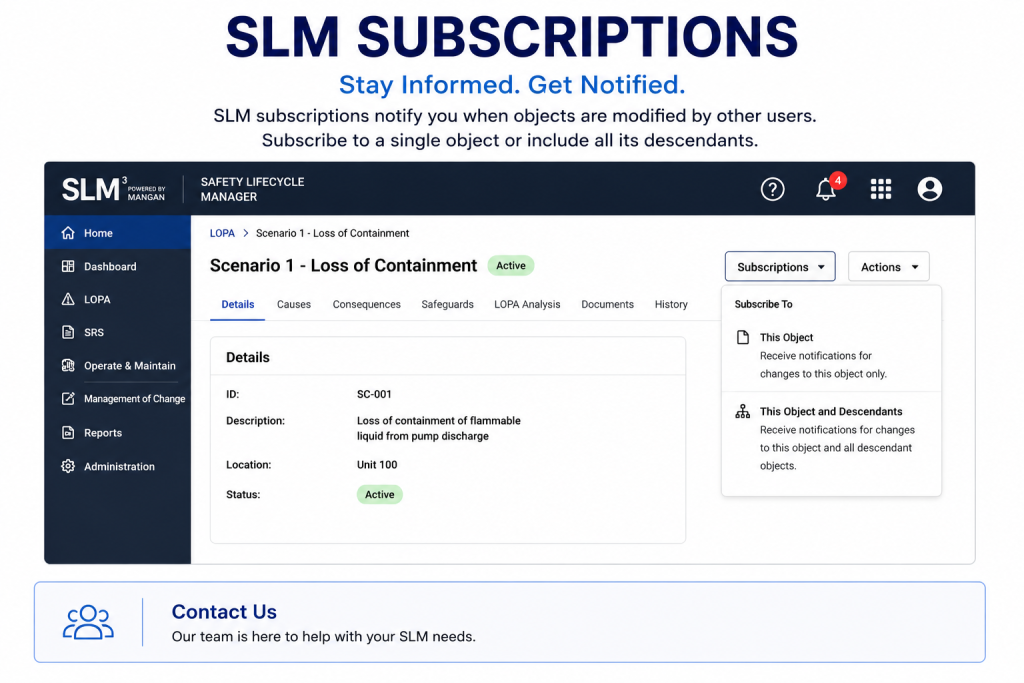
SLM subscriptions provide a mechanism for users to receive notifications when objects are modified by other users. Notifications can also include updates to child objects depending on the subscription type selected.
Subscriptions help users:
- Monitor important objects
- Track changes made by other users
- Stay informed about project updates
- Improve collaboration across teams
- Reduce the need for manual monitoring
How Subscription Tracking Works
When a user subscribes to an object, SLM monitors changes made to that object and generates notifications when modifications occur.
Users can choose between:
- Subscribing to a single object
- Subscribing to an object and all descendants
- Monitoring updates across an object hierarchy
This flexibility allows users to control how much information they receive while remaining aware of important changes.
Creating Object Notifications
To create a subscription:
- Browse to the desired module
- Select an object
- Open the Subscriptions dropdown
- Choose the subscription option
- Select either the object only or the object with descendants
Once configured, SLM begins tracking modifications and generating notifications for the selected content.
Organizations using complex asset structures can combine subscriptions with the SLM Object Tree to monitor specific branches of information more effectively.
Finding Your SLM Subscriptions
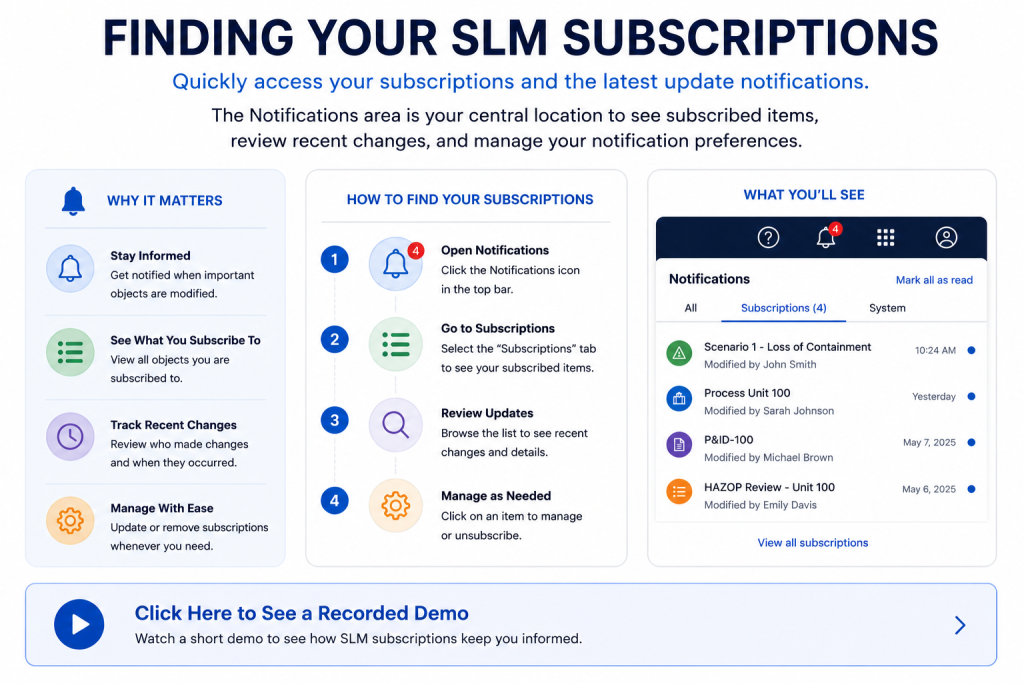
Users can quickly review their subscriptions through the notifications area within Safety Lifecycle Manager.
The notifications icon provides access to:
- Recent subscription updates
- Subscribed objects
- Change notifications
- Subscription management options
This provides a centralized location for monitoring activity across subscribed objects.
Managing Subscription Notifications
Subscription notifications help users remain informed when important information changes.
Notifications may be useful for:
- Process safety reviews
- Project management activities
- Asset updates
- Document revisions
- Workflow monitoring
Deleting SLM Subscriptions
Subscriptions can be removed at any time.
To delete a subscription:
- Open the notifications area
- Select your subscriptions
- Choose the subscription to remove
- Click Delete
Alternatively, users can return to the subscribed object and select the unsubscribe option directly from the Subscriptions dropdown.
Benefits of Using SLM Subscriptions
SLM subscriptions help organizations improve awareness, communication, and collaboration across process safety activities.
- Improved visibility of changes
- Reduced manual monitoring
- Faster awareness of updates
- Better collaboration across teams
- Improved information governance
- Enhanced user productivity
Subscriptions work particularly well alongside SLM Webviews and SLM Reports to improve information visibility across organizations.
Keeping stakeholders informed about important changes is a key part of effective information management. The UK Health and Safety Executive (HSE) provides guidance on managing safety information and maintaining effective communication processes within organizations.
Learn more about managing health and safety information from HSE.
SLM-101 Subscriptions
0:06
Welcome to this Application Explainer video, part of our SLM 101 topic range.
0:11
In this video, we’ll cover the subject of subscriptions within SLM.
0:16
The Subscriptions feature offers a means for users to get notifications on modifications to the objects by other users.
0:23
Modifications to the child objects by other users.
0:27
In this video, we’ll discuss creating a subscription, finding subscriptions, and managing subscriptions.
0:38
To access the subscription feature, browse to any module, click on the object of your choice, click the subscriptions drop down, and from here you can subscribe to an object which will subscribe to only that specific object, or you can subscribe to the object and all of its descendants that it may have, or any children that it may have.
1:09
After you’ve completed a subscription, see which items you’re subscribed to.
1:14
Click on this notifications icon.
1:18
In order to delete or manage subscriptions, click on your subscriptions, select a subscription you want to delete, and click on the Delete button.
1:27
Another way to unsubscribe is to go to any module where you have a subscription, come to the object, click on the subscriptions dropdown and unsubscribe to that object.


