
Using SLM Search
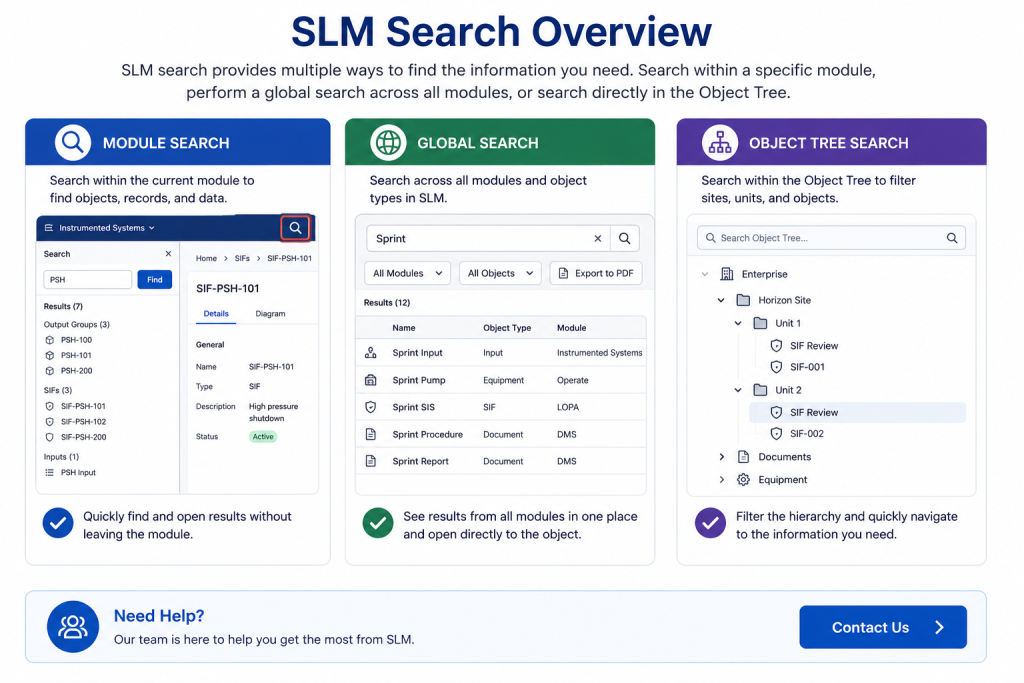
SLM search provides several ways to quickly locate information throughout Safety Lifecycle Manager. Users can search within individual modules, perform searches across the full software suite, or filter content directly within the object tree.
These search options help users find specific objects, documents, and records without manually browsing through large amounts of information.
What Is SLM Search?
SLM search enables users to locate content using keywords or phrases. Rather than manually navigating through modules and object hierarchies, users can enter search criteria and immediately view matching results.
Searches are not case-sensitive, meaning users receive the same results whether keywords are entered in upper or lower case.
Using SLM Search Within a Module
Module searches allow users to find information within a specific area of Safety Lifecycle Manager.
- Select a module using the module dropdown
- Click the search icon
- Enter a keyword or phrase
- Select Find
- Review matching results
Search results can include multiple object types depending on the selected module and matching criteria. Users can load any result directly into the right-hand display window.
Performing a Global Search
Global search allows users to search across all modules available to their account.
Users can:
- Search all modules simultaneously
- Filter results by module
- Limit searches to specific object types
- View matching objects across multiple modules
- Export search results to PDF
Search results often include information organized within the SLM Object Tree, allowing users to navigate directly to the relevant location.
Using SLM Search in the Object Tree
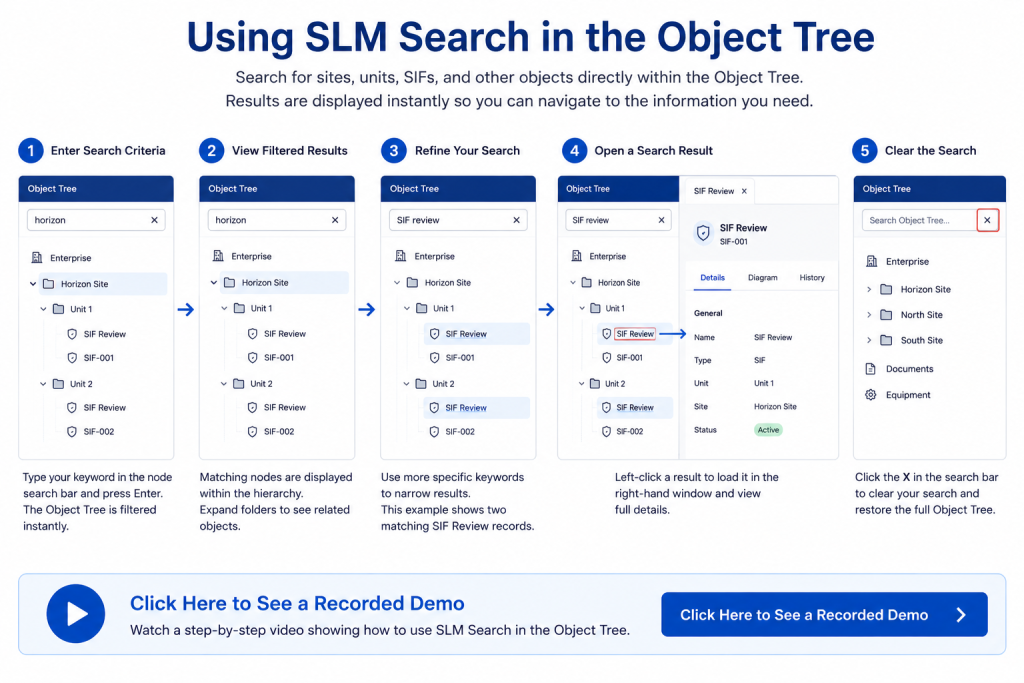
Users can also search directly within the object tree by entering keywords into the node search field.
Object tree searches allow users to:
- Filter sites
- Locate units
- Find specific SIFs
- Search object hierarchies
- Navigate directly to matching records
Results are displayed within the object tree, making it easy to locate information without leaving the current screen.
Refining Search Results
SLM provides several options for refining search results so users can locate information more efficiently.
- Module filtering
- Object type filtering
- Keyword searches
- Phrase searches
- Hierarchy filtering within the object tree
These tools help reduce the number of results returned and improve search accuracy.
Exporting Search Results
Global search results can be exported to PDF, allowing users to share search outcomes, review information offline, or maintain records of search activity.
This is useful when reviewing information across multiple modules or sharing findings with other stakeholders.
Benefits of Using SLM Search
SLM search improves efficiency by reducing the time required to locate information across large datasets and multiple modules.
- Faster information retrieval
- Reduced manual navigation
- Improved productivity
- Cross-module visibility
- Quick access to object data
- Flexible search options
Finding and retrieving information efficiently is an important part of maintaining effective management systems. The UK Health and Safety Executive (HSE) provides guidance on organizing and managing workplace information to support operational effectiveness. Learn more about managing information and processes from HSE.
SLM-101 Searching
0:07
Welcome to this Application Explainer video, part of our SLM 101 topic range.
0:12
In this video, we’ll be covering the subject of searching within SLMA.
0:17
Search is a means of enabling the user to quickly locate specific content within SLM using specific words or phrases without needing to explore the software in its entirety.
0:28
The following information will be covered in this training.
0:31
Chapter one we’ll be using a modular search, Chapter 2 we’ll be using a global search, and Chapter 3 we’ll be performing at a node search.
0:44
In chapter one, we’ll be covering searching for data in a specific module.
0:50
To perform a module search we must first navigate to a module using the module drop down selection tool located at the top.
0:57
Here.
0:59
Once we have selected our module, we can come across to the left and click on this magnifying glass.
1:04
We are then ready to enter our keyword or phrase.
1:08
So if I just type PSH and click find, we can now see the search criteria that matches our keywords.
1:16
So here we have a selection of output groups, a selection of Sifs and an input.
1:24
It’s worth noting that SLM searches are not case sensitive.
1:28
So if we type PSH in lower case and click find, we get exactly the same search results back.
1:36
Now if we wanted to load one of these search results, for example, I’ll use this SIF.
1:41
All we have to do is left click on the selection and that SIF is then loaded in this right hand window.
1:52
In Chapter 2, we’ll be covering searching the full SLM software suite.
1:57
SLM provides a global search option in the title bar.
2:01
Global searches cover all modules available to the user to conduct a global search.
2:06
So if we just type Sprint and we can either hit return or click on this magnifying glass, we have a light box open with the search results.
2:17
We can refine the search by opening this drop down arrow and selecting a specific module or all the modules.
2:26
We can come across to the options object and select all objects.
2:30
Or we could select in this example SLM data or DMS documents.
2:34
From the search results we can see that it’s returned any names with Sprint in the title, the details of that object and the modules where that search result is available.
2:48
So the input with the name Sprint in there is available in the LOPA Operate and Maintain and the Instrumented Systems module.
2:55
We can export the search results if need be by clicking the Export to PDF button.
3:01
Or if we wanted to load for example this top input in a certain module, we just click the module name which will be URL which will open a new window to display the input in that module.
3:13
So for example if I click instrument systems here we can see the instrument that we have clicked on has loaded in a new tab in the Instrument and Systems module.
3:23
In chapter 3 we will be covering searching the nodes in the object tree.
3:29
To complete a node search we need to navigate to the object tree and type our search criteria into the node search bar.
3:37
So if we were looking for the horizon site, type horizon, hit return and we can see the object tree has been filtered for the horizon site.
3:48
If we wanted to be slightly more granular and search for a SIF named SIF review, we just type that into the search bar, hit return and we can see there are two instances of that SIF.
4:01
They’re both within the same site and they’re separate units.
4:05
To load this SIF or any search result, all we need to do is left click and it will be loaded into the right hand window.
4:11
To clear a search, all we need to do is navigate to the object tree, come up to the search window, hit the X button and the search is cleared.


