
Personnel Configuration
Personnel Configuration within the SLM Global Module allows organisations to manage users, approvers and approval authorities from a central location. Personnel objects define who can approve specific records, which organisational units they are responsible for and how approval workflows operate across multiple sites. This guide expands on the Global Module training by explaining how Personnel Configuration supports governance, approval management and enterprise administration.
Each Personnel object can be linked directly to an SLM user account, allowing approval notifications, email workflows and competency records to be managed from a single location. Organisations can configure primary, backup and escalation approvers to ensure approval processes continue even when personnel are unavailable.
This guide explains how to configure Personnel objects, assign approval authorities and implement reliable approval workflows throughout SLM.
What is Personnel Configuration?
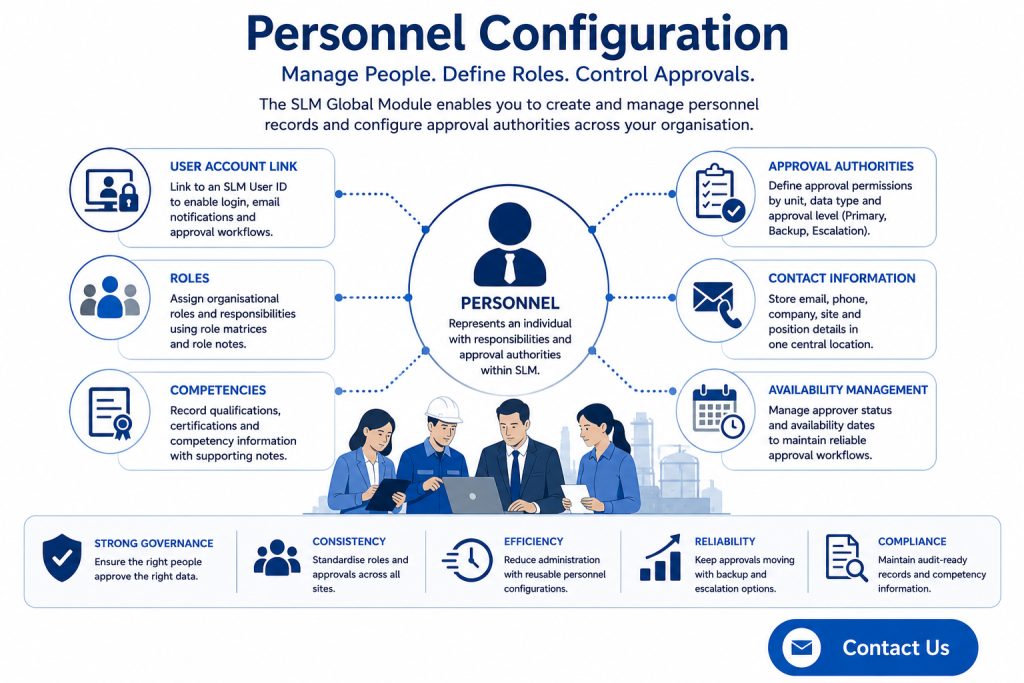
Personnel Configuration is used to create and manage personnel records within the SLM Global Module. Each Personnel object represents an individual who performs activities within the system and may have approval responsibilities for specific objects, checklists or operational records.
Personnel records can be linked directly to SLM user accounts, allowing approval emails, workflow notifications and user authentication to operate automatically.
Each Personnel object can include:
- Personal information
- Company and site details
- Job position
- Email address
- Certifications
- Role assignments
- Competency records
- Approval authorities
Personnel can be created individually or copied from existing sites to simplify deployment across multiple facilities.
For an overview of enterprise administration, see the System Module Global Configuration guide.
These capabilities are provided through the SLM Global Module.
Personnel Configuration for Creating Personnel Records
Personnel records are normally created at the Site level within SLM, where administrators can either create new personnel or copy existing records from another site.
When creating a new Personnel object, administrators typically enter:
- First name
- Last name
- SLM User ID
- Company
- Site
- Position
- Email address
- Contact information
- Certifications
Linking the Personnel object to an SLM User ID automatically associates the user account with approval workflows and notification emails.
Additional certification and competency information can also be recorded to support qualification management throughout the organisation.
Configuring Roles and Competencies
After creating the Personnel record, administrators configure the individual’s organisational roles and competency information.
SLM allows organisations to assign:
- Role matrices
- Role notes
- Competency matrices
- Competency notes
- Operational responsibilities
These settings help define each person’s responsibilities while providing a structured approach to managing qualifications and organisational capability.
Maintaining accurate competency information also assists with demonstrating compliance during audits and functional safety assessments.
Personnel Configuration Approval Authorities
One of the most important aspects of Personnel Configuration is assigning approval authorities.
Approval permissions determine which records a person can approve and the organisational units where those permissions apply.
Administrators can configure approval authority by:
- Business unit
- Data type
- Approval role
- Primary approver
- Backup approver
- Escalation approver
This flexible permission model allows organisations to create approval workflows that accurately reflect operational responsibilities while ensuring governance requirements are maintained.
Managing Approval Workflows
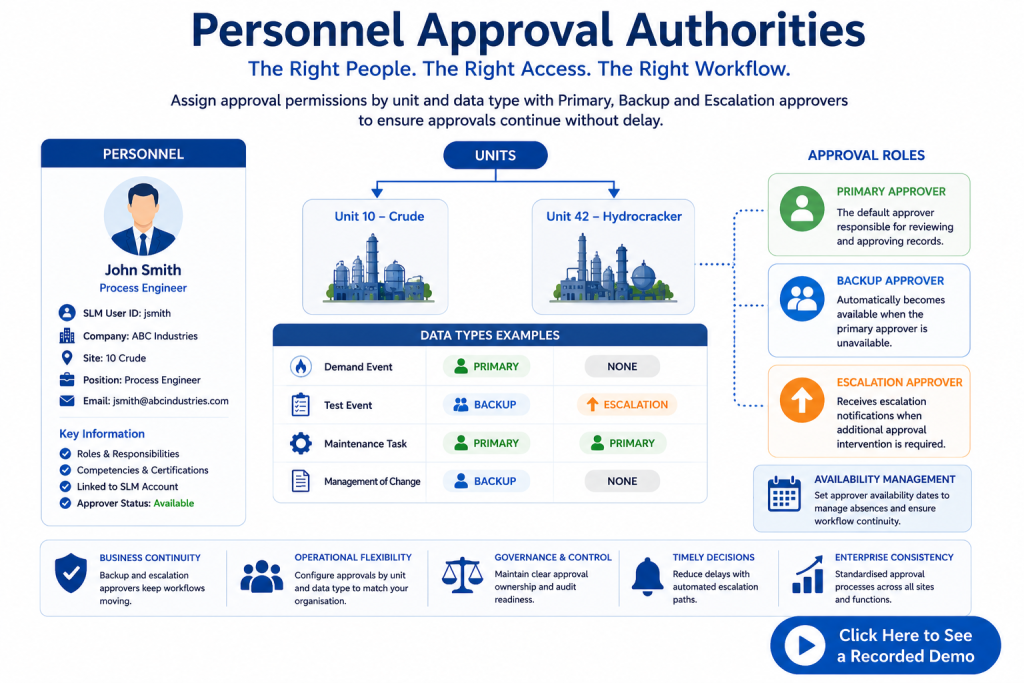
Once Personnel Configuration has been completed, administrators can manage approval workflows through the Approval Authorities template. This allows organisations to control which personnel can approve specific data types within individual operating units.
Approval authorities are configured by selecting the required organisational unit and assigning approval permissions for each data type.
Available approval types include:
- Primary approver
- Backup approver
- Escalation approver
- No approval authority
These permissions can be configured independently for every unit, allowing organisations to build approval workflows that reflect operational responsibilities while maintaining appropriate governance.
Changes to approval authorities take effect immediately after saving, ensuring new approval requests follow the updated workflow without requiring additional configuration.
Personnel Configuration Approval Levels
SLM supports multiple approval levels to ensure business processes continue even when key personnel are unavailable.
Each approval type performs a different role within the workflow:
- Primary Approver – the default individual responsible for reviewing and approving records.
- Backup Approver – automatically becomes available when the primary approver is marked unavailable.
- Escalation Approver – receives escalation notifications when additional approval intervention is required.
Approver availability can be controlled using availability dates, allowing temporary absences to be managed without manually reconfiguring approval authorities.
Escalation approvals broadcast notifications to designated personnel, helping ensure approval requests continue moving through the workflow without unnecessary delays.
Benefits of Centralised Personnel Configuration
Managing Personnel Configuration centrally provides organisations with greater consistency, improved governance and more reliable approval workflows.
Key benefits include:
- Centralised personnel administration.
- Consistent approval authorities across sites.
- Integrated user account management.
- Improved competency tracking.
- Reduced administrative effort.
- Greater resilience through backup and escalation approvals.
- Improved compliance and audit readiness.
When combined with the other Global Module administration features, Personnel Configuration helps organisations maintain secure, traceable and efficient approval processes throughout the SLM platform.
Related Global Module Resources
External Reference
For recognised guidance on process safety management and organisational governance, visit the AIChE Center for Chemical Process Safety (CCPS).
Global – Personnel Configuration
0:06
Welcome to this Application Explainer video, part of our Personnel topic range.
0:10
In this video we will cover the subject of configuration within SLM.
0:15
In SLM, the personnel object is used to identify an individual who works within a specific scope of the application.
0:23
This person has approval capabilities for certain objects within that scope based on the approval settings assigned to them for objects and or checklists.
0:33
Additionally, personal objects are linked to actual SLM accounts allowing the submission of emails during the approval process.
0:40
The following information will be covered in this training.
0:43
Chapter one will be Personal Object workflow, Chapter 2 will be managing approvals and Chapter 3 will be Approval Workflow.
0:56
In Chapter 1, we will cover how to create a personal object.
1:00
Users can add personal objects at the site level of SLM on the personal list template.
1:05
They can create new personnel or copy personnel from another site.
1:11
Personal objects can be added through the Personnel module.
1:16
Then selecting the specific site where the personnel will be assigned.
1:20
The user can then go to the Personnel List tab under the Grids Custom Actions.
1:28
You can click here to add personnel or you can copy personnel from another site.
1:34
When creating new personnel, users are required to enter a first name and a last name.
1:43
The SLM user ID will be linked to the SLM account associated with the Personnel object.
1:51
Additional fields can be filled in by the user as well such as status, company, home, site, position, e-mail.
2:02
In this scenario, since the personnel has been linked to an SLM user ID, the e-mail account associated with that will be pre populated phone notes certifications.
2:13
Here we have some default certifications, but you can add your own certification here in other and enter the certification number for that in the Approver data section.
2:26
If an SLM user ID was selected in the example at the top here, you can confirm this personnel as an approver.
2:34
If it’s an approver, then we can use the approver status to either be available or unavailable.
2:40
If the approver is unavailable, we then have to specify an approver availability date when the approval will become available again.
2:49
Then click Next.
2:50
In the next step of the workflow, users can configure the role matrix for the personnel along with the role notes at the bottom here, then click Next again.
3:03
Following this, the competencies matrix is set up including a field at the bottom for competency related notes.
3:15
Let’s now click Next again.
3:20
Users will now see a list of units where the personnel will have approval capabilities within the current site.
3:26
In this scenario, this site has 2 units, so let’s select both of those and click next.
3:31
Finally, a list of all data types where an approval process is displayed.
3:35
In this matrix, individual approval permissions can be configured for each data type, either for all of the units or for specific units.
3:45
The available types of permissions include None, primary, backup, and escalation.
3:55
For the purpose of this tutorial, let’s assume the person will have primary approver access for all units.
4:02
Regarding bypass authorization, let’s also set up a backup approver on Unit 10 Crude for the Demand event, and let’s add Escalation for Test event records in the Unit 42 Hydra cracker.
4:22
Once all settings are configured, let’s click Save.
4:27
After the workflow is complete, users will be able to view the list of personnel created for the site within the Personnel List tab.
4:36
Users can delete or edit the specific fields for any personnel on this grid.
4:43
The second option for creating a personal object is by copying personnel from another site.
4:50
Users need to choose the source site and then select the personnel they want to copy and then click Save.
5:06
The personnel will now appear in the list of the current sites.
5:14
In Chapter 2, we’ll cover how to configure the data types a personal object has approval capabilities for and define the types of approval level.
5:23
To manage approvals, users can select the personnel either from the site scripts on the personal list template or within the object tree.
5:35
Once at the personnel level, users can click on the Approval Authorities template.
5:40
This group will display all the approval permissions the personnel has over data types for specific units.
5:47
Permissions can be managed through the Manage Approval Authorities button.
5:52
At this point, users can choose the unit for which they’re setting permissions, then click Next.
5:58
In the following steps, users can configure the type of approval the Personnel will have over specific data types for the selected units.
6:13
Finally, once the configuration is complete, click on Save and the new settings will be displayed on the Approval Authority template.
6:26
In Chapter 3, we’ll cover how the different levels of approval work, including Primary, Secondary, and Escalation.
6:35
In order to demonstrate the approver type Primary, we need to make sure that on a specific site we have a Personnel which has an SLM account associated and also this personnel is an approver with an approver status available.
6:56
Also in the approval authorities.
6:58
We need to make sure the approval type for this personnel is set to primary.
7:02
For the purpose of this demonstration, we set up an approver approval number one under the 10 crude unit under the type name demand event and the approver type as primary.
7:14
Now let’s go to operate and maintain to a demand event under 10 crude and select this demand event.
7:23
Click on the Demand event approval tab under the Submit for approval section under submitted to, we can select approval number one.
7:32
If we now click submit, the demand event has now been submitted for approval.
7:38
In order to approve this demand event, we need to switch accounts.
7:45
Let’s log in with approver #1.
7:52
Let’s go to operate and maintain under the 10 crew unit.
7:55
If we open the demand events and select the demand event that was submitted for approval, as we can see, approver #1 has the option to approve or disapprove this object.
8:10
Let’s go ahead and click approve, and this completes the workflow on how the Approver type primary works.
8:18
In order to demonstrate the Approver type backup, if we go to a specific site where we set up the original approver #1, for this demonstration, we’ve associated an approver #2 account.
8:33
We also need to make sure that the person is confirmed as an approver and that the approver status is available under approval authorities.
8:44
We need to make sure that the personnel has approver type backup.
8:48
For this scenario, we’ve got the type name as a demand event and the unit ID is A10 crude unit.
8:53
Again, for approver #2, as we can see, we also have approver #1 set up again, which is the primary account under the competencies.
9:08
We can see that we have approval number one as primary and approval #2 set as the backup.
9:14
Now let’s go over to a demand event in Operate and Maintain.
9:21
So let’s click on the Demand event Approval tab.
9:26
If we click Edit, we can see that it only has approval #1, which is a primary approver.
9:33
Now, in order for the backup approver to show up in this list, approver #1 must not be available.
9:39
So if we go back to Approve number one, click on the personnel data, come down to the approver data and change the status to unavailable, and choose a future date when they’re available again and click Save.
9:59
Now approval number one is unavailable, which means that the backup approver will take the place of the approver.
10:05
If we come and refresh this template for the demand event Approval, we click on Submitted to and we can see we now have approval #2 as an option since approval number one is not available at the moment.
10:17
So let’s click on approval #2 and click Submit.
10:21
Let’s now change accounts and log in as approval #2.
10:29
Let’s go to operate and maintain.
10:34
We’re in the 10 crude unit.
10:37
Come to the Demand event.
10:38
Let’s click on Demand event approval, and we can see that Demand event has the option to approve or disapprove by approver #2.
10:50
Let’s click on Approve to approve the object.
10:53
We’ve now concluded the workflow and how to use the Approver type backup.
11:00
Let’s now go over the escalation approval process for when a personal object has an escalation authority set up.
11:09
Let’s bring back approver #1 back to an available state and click on Save.
11:20
If we go to the approval authorities tab, we can see that for the demand event under the 10 crew unit, we have as a primary approver, approver #1.
11:30
As a backup, we have approver #2 no other personnel has been set up as an escalation yet.
11:40
If we now come over to Demand event and we submit this for approval, at this point, it’s only going to show primary or backup approvals if there’s no primary available.
11:57
Since we brought back the approval #1 available, it’s showing up here as the main person to submit to.
12:04
So let’s select this one and click Submit.
12:07
If we now use a different browser window, a private browser window, let’s log in as approval #1 so we can take a look at the Demand event.
12:26
We come to the Operate and maintain module, come down to our demand event, the demand event approval tab.
12:36
We can see the event has been submitted to approve number one for approval.
12:40
So the approver could either approve or disapprove, but there’s no way to escalate it at this stage.
12:46
This is happening because no personnel has been set up as an escalator yet as escalation for the demand event under the 10 crude unit.
12:54
So if we come back to the other browser, let’s go back to the personnel module.
12:59
Let’s say that we’d like to set up approval #2 as escalation.
13:04
So let me just click on approval number two, Approval authorities, manage approval authorities, 10 crude unit.
13:13
And then instead of a backup, let’s select Escalation for the demand events.
13:18
Click Save.
13:24
Now.
13:24
If we go back to approval number one and we refresh this template, we can see that the Escalate button has now been enabled.
13:33
There can be many escalations for demand events under the temp crude unit.
13:38
Escalation will send a broadcast e-mail to all of those personnel accounts, and whoever sees the notification first can come to the operate and Maintain module and approve this demand event.
13:48
Let’s click on Escalate.
13:54
As we can see, the approval number one has escalated this approval process.
13:59
Now let’s sign out.
14:02
Let’s log in as approval #2 and we’ll come to the Operate and Maintain module.
14:14
Come to the Demand event, Demand Event Approval tab.
14:21
Now we can see that approver #2 has the option to approve or disapprove this object.
14:27
Once approved, we’ve completed the approval escalation workflow.


