
LOPA Connecting Barriers Guide
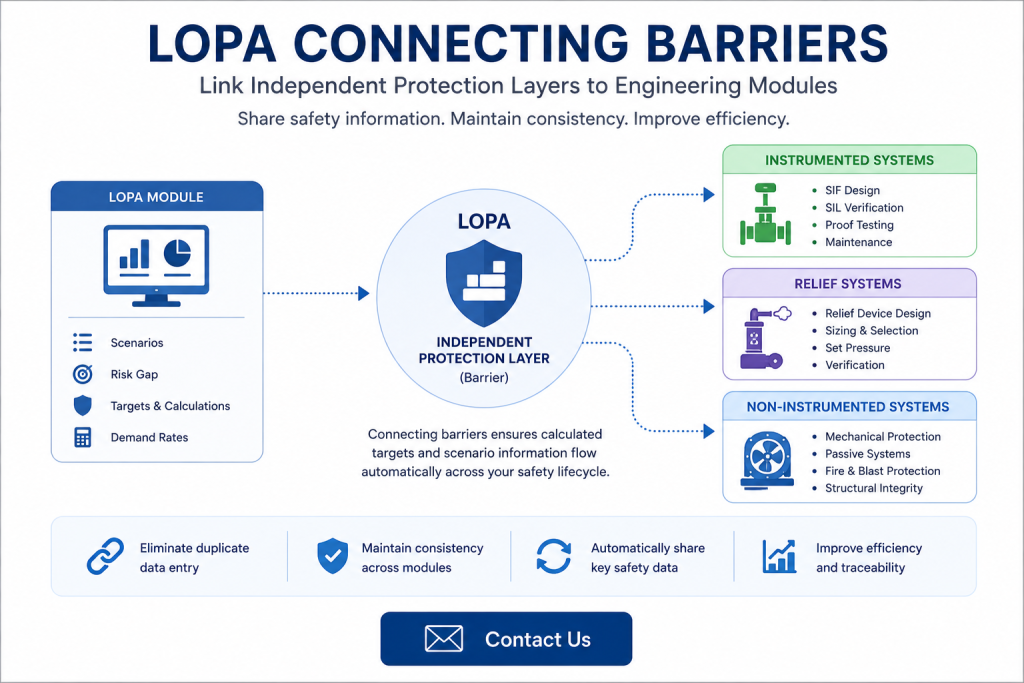
LOPA Connecting Barriers enables Independent Protection Layers (IPLs) identified during a Layer of Protection Analysis to be directly linked with engineering functions. Rather than managing safety information separately across multiple disciplines, connected barriers allow important design and performance data to flow automatically between LOPA and other safety lifecycle modules.
Within Mangan Software Solutions’ Safety Lifecycle Manager (SLM), connecting barriers ensures that calculations performed during a LOPA study—including target Risk Reduction Factors (RRF), Probability of Failure on Demand (PFD), Safety Integrity Level (SIL) targets and calculated demand rates—are available wherever they are needed throughout the engineering lifecycle.
This guide explains how barrier connections work, what information is shared between modules, and why maintaining these links improves consistency throughout functional safety projects.
Understanding LOPA Connecting Barriers
IEC 61511 requires Independent Protection Layers (IPLs) to reduce the likelihood of hazardous events to an acceptable level. Once these protection layers have been identified during a Layer of Protection Analysis (LOPA), they often need to be referenced throughout the remainder of the safety lifecycle.
Rather than manually recreating this information, SLM allows barriers identified during LOPA studies to be connected directly to engineering functions within other modules.
Connecting barriers provides several advantages:
- Eliminates duplicate data entry
- Maintains consistency across engineering disciplines
- Automatically shares calculated safety targets
- Supports end-to-end functional safety workflows
- Improves traceability throughout the project lifecycle
If you’re new to Layer of Protection Analysis, start with our What Is LOPA? guide before exploring barrier connections.
Why Use LOPA Connecting Barriers?
During a LOPA study, barriers are analysed to determine whether they provide sufficient risk reduction for each hazardous scenario. Once these calculations have been completed, the same information is valuable when designing Safety Instrumented Systems, relief systems and other engineered protection layers.
Connecting barriers allows calculated values to be reused instead of being manually transferred between teams.
Information shared through barrier connections includes:
- LOPA scenario information
- Target Safety Integrity Level (SIL)
- Target Risk Reduction Factor (RRF)
- Probability of Failure on Demand (PFD)
- Calculated barrier demand rates
This improves engineering efficiency while reducing the possibility of transcription errors between hazard analysis and detailed design.
How to Configure LOPA Connecting Barriers in SLM
Connecting a barrier is a straightforward process within SLM.
- Open the LOPA module.
- Navigate to the required barrier within the object tree.
- Locate the Function Link field.
- Search for the required engineering function.
- Select the appropriate function.
- Save the barrier.
Multiple engineering functions can be linked where appropriate, allowing a single barrier to support several areas of the engineering design.
Once connected, selecting the function link provides direct navigation to the associated engineering object, improving traceability throughout the project.
Information Shared Through LOPA Connecting Barriers
One of the greatest advantages of connecting barriers is the automatic transfer of important engineering data.
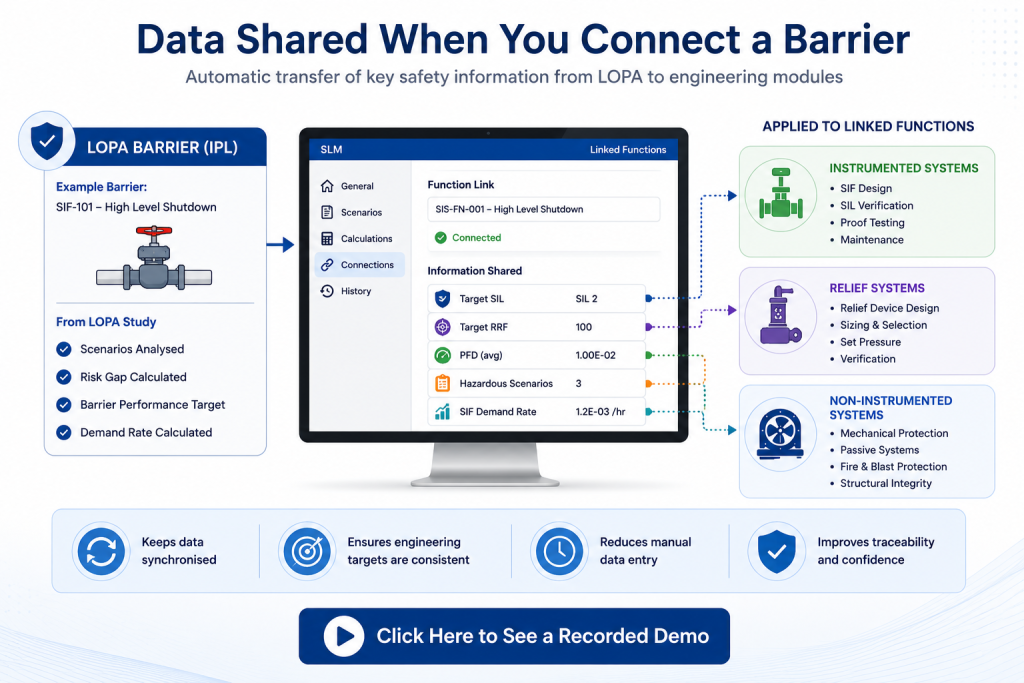
SLM shares information generated during the LOPA study directly with connected engineering functions, including:
- Target Risk Reduction Factor (RRF)
- Probability of Failure on Demand (PFD)
- Required Safety Integrity Level (SIL)
- Hazardous scenario information
- Calculated Safety Instrumented Function (SIF) demand rates
Because this information is transferred automatically, engineering teams always work with the latest approved LOPA calculations rather than manually maintained spreadsheets or documents.
To understand how these values are generated, see our LOPA Calculations Guide.
Supporting the Functional Safety Lifecycle
Barrier connections support a consistent digital thread throughout the functional safety lifecycle.
Instead of treating hazard analysis, engineering design and lifecycle management as separate activities, connected objects allow safety information to remain synchronised across disciplines.
This supports:
- Improved traceability
- Consistent engineering targets
- Reduced manual administration
- Simplified project reviews
- Better management of design changes
Barrier connections also make it easier to demonstrate that engineering designs continue to satisfy the original LOPA recommendations throughout implementation.
How SLM Simplifies Barrier Management
Conducting an FSA using Safety Lifecycle Manager provides a structured, repeatable and fully auditable assessment process aligned with IEC 61511.
Key capabilities include:
- Guided assessment workflow.
- Automatic IEC 61511 stage checklists.
- Optional self-assessments.
- Participant management.
- Integrated action tracking.
- Automatic report generation.
- Approval workflow.
- Complete audit trail.
By replacing spreadsheets and disconnected documents with a single digital workflow, organisations can improve consistency, reduce administration and demonstrate compliance more effectively.
Learn more about the MSS Functional Safety Assessment Module and how it supports every stage of the Functional Safety Assessment process.
Frequently Asked Questions
What are LOPA connecting barriers?
LOPA connecting barriers link Independent Protection Layers identified during a LOPA study with engineering functions so calculated safety information can be shared automatically across modules.
What information is transferred?
Barrier connections share target SIL, Risk Reduction Factor (RRF), Probability of Failure on Demand (PFD), hazardous scenario information and calculated demand rates.
Can one barrier be linked to multiple functions?
Yes. SLM allows a barrier to be connected to multiple engineering functions where appropriate, helping maintain consistency across different systems.
Why should barriers be connected?
Connecting barriers reduces duplicate data entry, improves traceability, ensures engineering teams use the latest LOPA calculations and supports compliance throughout the functional safety lifecycle.
External Reference
For guidance on Independent Protection Layers and the functional safety lifecycle, refer to the International Electrotechnical Commission (IEC), publisher of IEC 61511.
Connecting Barriers
0:06
Welcome to this Application Explainer video, part of our Loper topic range.
0:10
In this video we’ll cover the subject of connecting barriers in SLM.
0:15
IEC 61511 specifies a need to put in place independent protection layers to reduce the risk of an identified hazard.
0:23
The LOPA module is used to identify these Ipls or barriers with a way to connect them directly to the functions in the Instrumented Systems, Relief Systems and Non Instrumented Systems modules.
0:34
Connecting the barriers allows information to be shared across modules, namely the LOPA scenario information, the target RRF, PFD sill, and the calculated demand rate.
0:50
To start the process of connecting a barrier to a function in the engineering modules, navigate to the Loper module and navigate to the barrier in the object tree.
1:02
In the function link field, select the desired function from the engineering modules.
1:10
This can be multiple functions at once, and it shows every possible type of function.
1:17
Enter in the desired function into the search field so it navigates to it quickly.
1:22
Click Save and now it’s linked.
1:26
Clicking on the function link takes you directly to that function in the instrumented systems, where you can see the effects of connecting the barrier to the function.
1:36
First, it carries over the performance target, sill, risk reduction factor, and probability of failure on demand.
1:44
Next, it carries over the hazardous scenarios from LOPA and 3rd on the General tab.
1:52
The calculated SIFT demand rate is also brought over.


