SIS Audits
SIS audits are an essential part of maintaining an effective Functional Safety Management (FSM) system throughout the operational life of a Safety Instrumented System (SIS). Unlike a Functional Safety Assessment (FSA), which verifies compliance at defined lifecycle stages, SIS audits evaluate whether functional safety management processes continue to be implemented, maintained and followed in accordance with IEC 61511.
Many organisations still perform audits using spreadsheets, Word documents and paper-based checklists. Digital SIS audit software provides a far more efficient approach by standardising audit workflows, recording findings, assigning action items and automatically producing comprehensive audit reports.
This guide explains what SIS audits are, how they support IEC 61511 compliance and how the MSS Functional Safety Assessments Module simplifies the complete audit process.
What Are SIS Audits?
SIS audits are systematic reviews of an organisation’s Functional Safety Management system to verify that the required procedures, documentation and working practices continue to satisfy IEC 61511 requirements.
The purpose of an SIS audit is to determine whether the functional safety management system is:
- Implemented correctly.
- Current and up to date.
- Being followed consistently.
- Supported by appropriate evidence.
- Continuously improved.
Unlike Functional Safety Assessments, which occur at defined lifecycle stages, SIS audits are typically performed periodically throughout the operational life of the Safety Instrumented System.
To understand Functional Safety Assessments, see our Functional Safety Assessment (FSA) guide.
IEC 61511 Requirements for SIS Audits
IEC 61511 requires organisations to maintain an effective Functional Safety Management system throughout the entire safety lifecycle. Periodic SIS audits help demonstrate that these management processes remain effective over time.
An SIS audit typically reviews:
- Functional Safety Management procedures.
- Document control.
- Management of change.
- Competency records.
- Maintenance procedures.
- Proof testing records.
- Previous audit findings.
By conducting regular audits, organisations can identify weaknesses before they affect the performance or compliance of their Safety Instrumented Systems.
For more information about the functional safety standard, see our IEC 61511 guide.
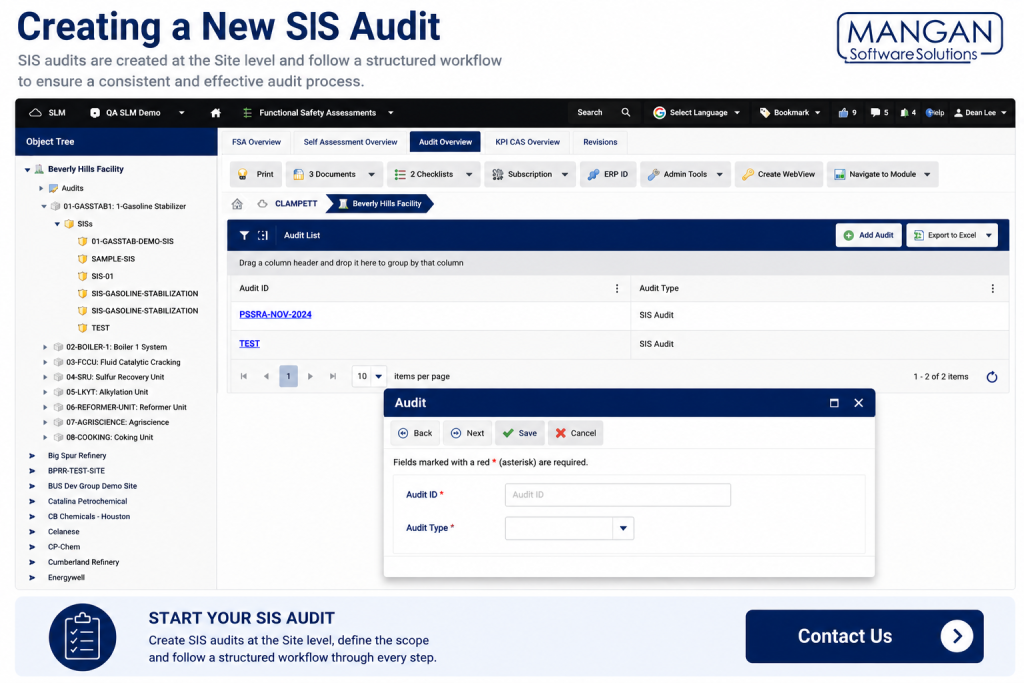
Creating a New SIS Audit
SIS audits are created at the Site level within the MSS Functional Safety Assessment Module. Unlike Functional Safety Assessments, an SIS audit cannot span multiple sites and is always associated with a single operating location. :contentReference[oaicite:0]{index=0}
Creating a new audit typically involves:
- Selecting the appropriate site.
- Creating a new SIS Audit.
- Entering the audit scope.
- Defining participants.
- Saving the new audit.
Once created, the audit follows a structured workflow that guides the auditor through each stage of the review.
Recording SIS Audit Information
The SIS audits workflow closely mirrors the Functional Safety Assessment process, providing a consistent and repeatable approach to recording audit information.
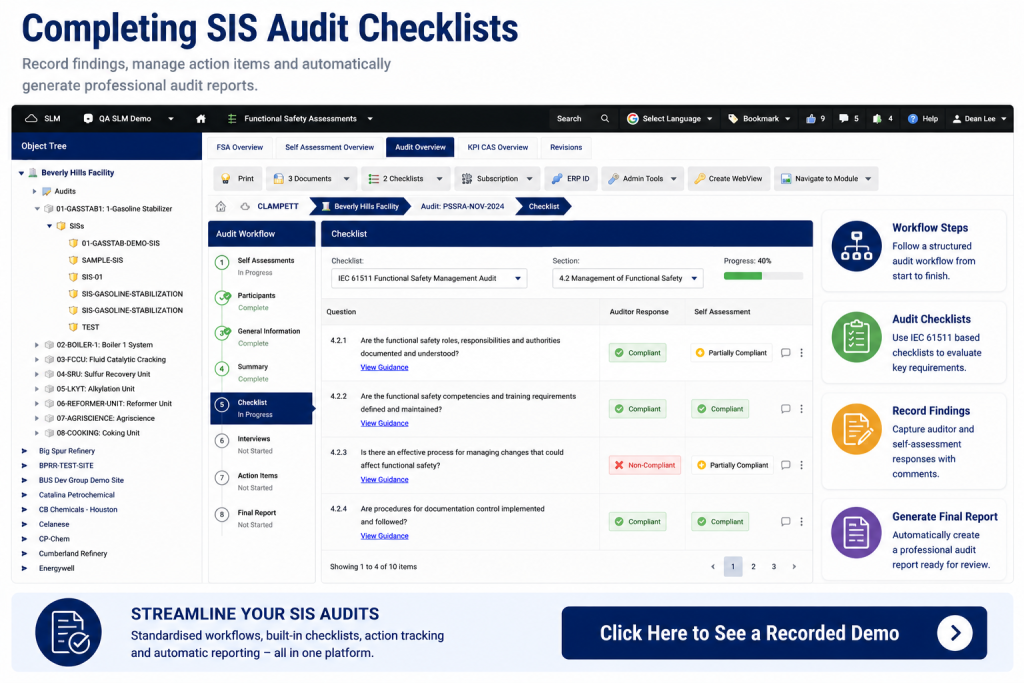
The audit workflow includes:
- Self-assessments.
- Participants.
- General information.
- Audit summaries.
- Checklists.
- Interviews.
- Action items.
- Final report.
Independent auditors record their findings throughout each stage while site personnel can complete self-assessments for comparison where appropriate.
Managing Findings and Action Items
During SIS audits, observations and non-conformances are recorded directly against checklist items, allowing every finding to remain fully traceable.
Action items can be created whenever improvements are required, ensuring issues are tracked through to completion.
Benefits include:
- Complete audit traceability.
- Centralised action management.
- Improved accountability.
- Clear ownership of corrective actions.
- Automatic inclusion within the final audit report.
Learn more about tracking improvements using our Corrective Action Management Software guide.
Automatically Generating the SIS Audit Report
Once the audit has been completed, Safety Lifecycle Manager automatically generates a professional SIS audit report using the information recorded throughout the workflow.
The report typically includes:
- Audit scope.
- Participants.
- Checklist findings.
- Interview summaries.
- Action items.
- Overall conclusions.
Automatically generating reports reduces administration while ensuring every audit follows a consistent reporting format.
Why Use MSS for SIS Audits?
SIS audits performed within Safety Lifecycle Manager provide organisations with a repeatable, auditable and standards-based approach to functional safety auditing.
Key benefits include:
- Structured audit workflow.
- Standardised IEC 61511 checklists.
- Integrated self-assessments.
- Participant management.
- Automatic action tracking.
- Professional report generation.
- Complete audit history.
Digital SIS audits improve consistency, reduce administration and make demonstrating IEC 61511 compliance significantly easier.
Learn more about the Functional Safety Assessments Module.
Why Use MSS for SIS Audits?
SIS audits performed within Safety Lifecycle Manager provide organisations with a repeatable, auditable and standards-based approach to functional safety auditing.
Key benefits include:
- Structured audit workflow.
- Standardised IEC 61511 checklists.
- Integrated self-assessments.
- Participant management.
- Automatic action tracking.
- Professional report generation.
- Complete audit history.
Digital SIS audits improve consistency, reduce administration and make demonstrating IEC 61511 compliance significantly easier.
Learn more about the Functional Safety Assessments Module.
Related Functional Safety Resources
You may also find these guides useful:
- Conducting an FSA
- Functional Safety Assessment (FSA)
- IEC 61511
- Safety Integrity Levels (SIL) Explained
- Functional Safety Management Software
For additional information on the IEC 61511 functional safety lifecycle, visit the International Electrotechnical Commission (IEC).
SIS Audits
0:06
Welcome to this application Explainer video, part of our FSA topic range.
0:10
In this video, we’ll cover the subject of SIS audits in SLM within SLM’s Functional Safety Assessment module.
0:18
SIS audits may be conducted and recorded using a guidance system of steps to record the information required for functional safety audits per IEC 61511.
0:30
The following information will be covered in this training.
0:33
Chapter one will be creating a new SIS audit and Chapter 2 will be recording SIS audit information.
0:44
In Chapter 1, we’ll cover how to create a new SIS audit and things to consider.
0:49
SIS audits are only created under the site level and may not be linked to multiple sites.
0:55
The purpose of sys audits is to review information, documents, and records to determine whether the functional safety management system is in place, up to date, and being followed in SLM.
1:06
A sys audit must be created from the site level as seen in the Sys Audit overview table.
1:12
It can be created by clicking the Add Sys Audit button in the top right corner of the Sys Audit list table.
1:22
The new Sys Audit object will be very similar to the FSA workflow, identifying the self-assessment participants, summary, introduction, checklist, interviews, action items, and a final report.
1:37
Once more in Chapter 2, we’ll cover information to record during the execution of an SIS audit and things to consider.
1:48
The SIS audit functionality is identical in concepts to recording of functional safety assessments in SLM.
1:56
Upon creation of the SIS audit in SLM, the system will provide a workflow similar to the FSA functionality where the independent functional safety auditor will record his findings as he moves through the sys audit steps.
2:09
Like the FSA self-assessment functionality, site personnel will also be provided the opportunity to enter self assessments for the sys audit as well, entering status for the comments for the same questions that the independent auditor will be presented with.
2:25
The remaining steps in the audit information will be entered by the independent auditor recording for the sys audit, the participants, the general information and summaries, the checklist findings complete with action items to be entered as well any interviews that are conducted and any action items identified through the checklist findings or identified independently.
3:01
Also, like the FSA functionality, the Sysaudit final report will be generated by SLM automatically from the information entered into the Sysaudit steps in a preformatted report ready for the site.


