Enterprise Projects - Managing SIS
Enterprise Projects in SLM enables engineering teams to work on Safety Instrumented System (SIS) changes within dedicated project workspaces, without directly affecting the live production database. By separating project activities from production, organisations can safely develop, review and validate engineering changes before they are merged into operational data.
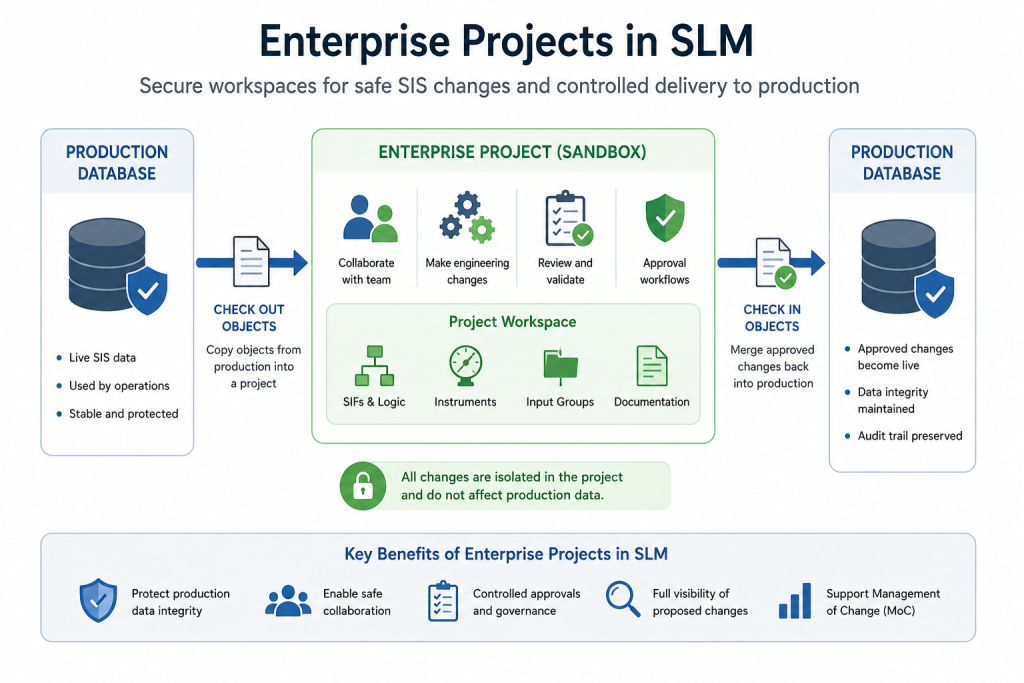
Each Enterprise Project acts as a controlled sandbox where users can modify objects, collaborate with other engineers and complete approval workflows while maintaining the integrity of the production environment. Once all proposed changes have been reviewed and approved, they can be merged back into production using a structured check-in process.
This guide explains how Enterprise Projects in SLM are configured, how project workspaces support collaborative SIS engineering, and how controlled approval workflows help maintain accurate and auditable functional safety data.
What Are Enterprise Projects in SLM?
Enterprise Projects in SLM provide isolated engineering workspaces where modifications can be made safely before being introduced into the production database. Instead of making changes directly to live Safety Lifecycle Manager data, engineers check objects into a project where they can be updated, reviewed and validated independently.
According to the training, an Enterprise Project functions as a designated workspace or sandbox. Once modifications have been completed and verified, users merge the approved changes back into production, ensuring the integrity and stability of the core database throughout the engineering process.
Enterprise Projects are particularly valuable for:
- Managing SIS modification projects.
- Testing engineering changes before deployment.
- Supporting Management of Change (MoC) procedures.
- Allowing multiple engineers to collaborate safely.
- Protecting production data from unapproved changes.
- Maintaining a complete history of proposed modifications.
Where engineering projects involve large-scale data updates, Enterprise Projects work alongside the Data Management Processing Adapters and Data Management Export Adapters, allowing data to be reviewed and validated before production changes are applied.
Why Use Enterprise Projects in SLM?
Engineering teams frequently need to modify Safety Instrumented Functions (SIFs), instruments and related engineering data while operational systems continue to be used by other personnel. Enterprise Projects in SLM provide a structured method for completing this work without disrupting production users or introducing incomplete engineering changes.
Rather than editing production data directly, authorised users work within a dedicated project where every proposed change can be reviewed before implementation. This supports better governance, improves collaboration and reduces the risk of unintended modifications.
Key benefits include:
- Dedicated engineering workspaces.
- Controlled project-based change management.
- Configurable approval workflows.
- Improved collaboration between engineering teams.
- Protection of production SIS data.
- Clear visibility of proposed project changes.
Projects involving Safety Instrumented Functions can also benefit from understanding the wider functional safety context described in the Safety Integrity Levels (SIL) Explained guide.
Setting Up Enterprise Projects in SLM
Creating Enterprise Projects in SLM begins within the Enterprise Projects module, where administrators define the project configuration before engineering work starts. The training demonstrates that each project can be tailored to suit the organisation’s approval processes, user permissions and project governance requirements.
During project creation, administrators configure:
- Project name and description.
- Optional start and end dates.
- Project users and user roles.
- Project administrators.
- Approval users and approval roles.
- Foreground and background project colours.
Optional approval controls can also be enabled for:
- Object check-out.
- Object check-in.
- Object deletion.
Project colours make individual workspaces easy to identify within the project selector, while role-based administration simplifies access management for larger engineering teams. As projects evolve, administrators can update users, approvers and project settings without interrupting ongoing engineering activities.
Checking Objects Out in Enterprise Projects
After an Enterprise Project has been created, authorised users can begin working with production data by checking objects out into the project workspace. This creates a working copy of the selected object, allowing engineering changes to be made without affecting the live production database.
The training demonstrates that users first select the required object while working in the production environment before choosing Check Out Object from the toolbar. They then select the destination Enterprise Project and submit the request. If check-out approval is not enabled, the request is processed immediately as a background task. If approval is required, the request is held until it has been authorised by an approved project user.
Once the background task has completed, the checked-out object becomes available within the selected Enterprise Project, where engineers can safely modify the object and its associated data.
Checking objects out is commonly used when:
- Developing SIS design changes.
- Testing engineering modifications.
- Updating Safety Instrumented Functions.
- Performing collaborative engineering reviews.
- Preparing changes before production deployment.
Working Safely Within an Enterprise Project
After objects have been checked out, engineers can make changes within the Enterprise Project without affecting the production database. All modifications remain isolated inside the project workspace until they have been reviewed and successfully checked back into production.
The training demonstrates several typical engineering activities, including updating Safety Instrumented Function properties, modifying process safety parameters, creating new Input Voting Groups, updating Inputs and removing obsolete objects. Each change is recorded within the project, allowing proposed modifications to be reviewed before implementation.
Working within an isolated project environment provides several advantages:
- Production data remains protected.
- Multiple engineering changes can be grouped together.
- Project teams can collaborate without disrupting operational users.
- Changes can be reviewed before implementation.
- Only approved modifications are merged into production.
Projects involving significant engineering updates can also benefit from using the Data Management Export Adapters to review engineering information before final approval.
By isolating engineering work from production, Enterprise Projects in SLM gives project teams the freedom to develop SIS changes while protecting live operational data.
Checking Objects Back into Production
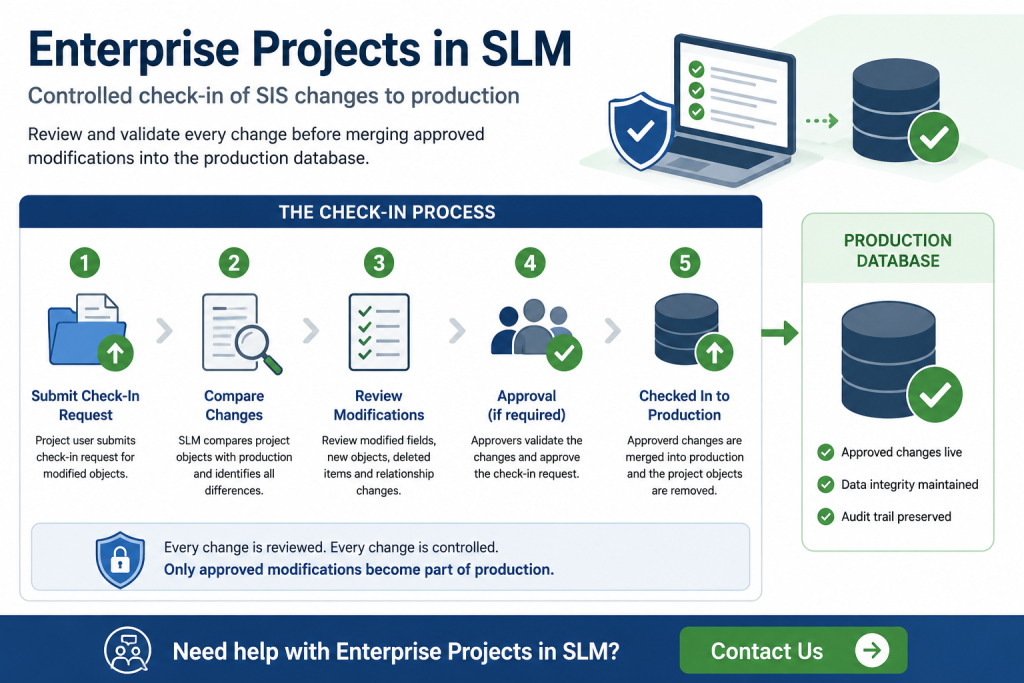
Once engineering work has been completed, authorised users can begin the check-in process. During check-in, Safety Lifecycle Manager compares the project version with the production version and presents a detailed summary of every proposed modification before the changes are committed.
The training shows that users can review modified fields, newly created objects, deleted objects and updated relationships before confirming the check-in request. This comparison provides confidence that only the intended changes will be merged into production.
The check-in review includes changes such as:
- Modified object properties.
- Updated engineering parameters.
- Newly created objects.
- Deleted objects.
- Relationship changes.
After the request has been submitted, SLM creates a background task to process the check-in. Once complete, the project objects are removed from the project workspace and the approved changes become part of the production database.
This controlled check-in process is one of the main reasons Enterprise Projects in SLM is valuable for managing complex SIS modifications.
Reviewing Proposed Changes
Enterprise Projects provides a detailed comparison of proposed modifications before they are merged into production. Rather than simply indicating that an object has changed, the comparison identifies the original production value alongside the proposed project value, making it easier for reviewers to validate engineering updates.
This review process helps engineering teams:
- Confirm every intended modification.
- Identify unexpected changes before approval.
- Validate engineering calculations.
- Review additions and deletions.
- Support formal Management of Change procedures.
By reviewing proposed changes before check-in, organisations reduce the risk of introducing incorrect or incomplete engineering information into the live SIS database while maintaining a complete audit trail of project activities.
Understanding Background Tasks
Throughout the Enterprise Project workflow, Safety Lifecycle Manager processes major activities as background tasks. Object check-out, check-in, approvals and other project operations are queued for processing, allowing users to continue working while the requested action completes.
The training demonstrates that background tasks provide status information throughout the workflow, allowing administrators to confirm when an operation has completed successfully before continuing with additional engineering activities. This approach improves system responsiveness while providing clear visibility of project progress.
Approval Workflows in Enterprise Projects
Enterprise Projects supports configurable approval workflows that help organisations control how engineering changes are introduced into production. Rather than allowing every modification to proceed automatically, administrators can require approvals before objects are checked out, checked back into production or deleted within a project.
Approval requirements are configured within the project settings and can be enabled independently for check-out, check-in and deletion activities. Once enabled, requests remain in a pending state until they have been reviewed by an authorised project approver.
This approval process provides an additional level of governance for engineering projects by ensuring that significant modifications are reviewed before they affect production data.
Approval workflows can be applied to:
- Object check-out requests.
- Object check-in requests.
- Object deletion requests.
- Engineering review activities.
- Management of Change procedures.
Managing Check-Out, Check-In and Delete Approvals
When approval workflows are enabled, authorised approvers review pending requests within the Enterprise Projects module before deciding whether to approve or reject them.
For a check-out request, the approver reviews the submitted object before allowing it to enter the project workspace. Once approved, the object is copied into the Enterprise Project and becomes available for engineering work.
Deletion requests follow a similar process. Instead of immediately removing an object from the project, the deletion remains pending until an authorised approver confirms the action. This helps prevent accidental removal of important engineering information.
During the check-in process, approvers review every proposed modification before merging changes into production. They can compare the original production values against the project values, ensuring that only validated engineering changes become part of the live database.
This structured approval workflow strengthens project governance while supporting compliance with internal engineering procedures and Management of Change practices.
Configurable approvals allow Enterprise Projects in SLM to support both simple engineering changes and more formal Management of Change workflows.
Importing SIS Data into Enterprise Projects
Enterprise Projects also supports controlled import activities. Rather than importing engineering data directly into production, administrators can import new Safety Instrumented System information into a project workspace where it can be reviewed before implementation.
The training demonstrates the use of the Smart Import Adapter to import SIFs, Input Groups, Input Voting Groups and related engineering data into an Enterprise Project. After selecting the project scope, users choose the import file, enable relational data where required and queue the import task.
Where relational data is included, Safety Lifecycle Manager completes the import in multiple stages, allowing users to review the proposed changes before finalising the import. Once complete, the imported engineering data is available within the Enterprise Project for further validation before being checked into production.
For organisations performing larger migration or administration activities, this workflow complements the Data Management Processing Adapters and Data Management Export Adapters, providing a complete process for importing, reviewing and managing engineering information.
Importing data into Enterprise Projects in SLM allows new SIS information to be validated before it is introduced into the production environment.
Enterprise Projects in SLM Best Practices
Using Enterprise Projects effectively helps engineering teams maintain a controlled and auditable approach to SIS modifications. By combining isolated project workspaces with configurable approval workflows, organisations can reduce the risks associated with modifying live production data.
Recommended best practices include:
- Create separate projects for major engineering activities.
- Assign project administrators and approvers before work begins.
- Enable approval workflows for production-critical systems.
- Review all proposed changes before check-in.
- Validate imported engineering data inside the project workspace.
- Use background task status to confirm successful processing.
- Maintain project records as part of the engineering audit trail.
Following these practices helps maintain data integrity while providing a repeatable workflow for collaborative functional safety engineering throughout the Safety Lifecycle Manager environment.
Related Resources
Authoritative External Reference
For additional guidance on managing safety instrumented systems throughout their lifecycle, see the IEC 61511-1 Functional Safety standard.
Enterprise Projects – Managing SIS Projects in SLM
0:06
Welcome to this Application Explainer video, part of our special Enterprise Projects topic range.
0:12
In this video, we’ll cover the subject of managing the SLM projects.
0:17
An enterprise project in SLM is a designated workspace or sandbox where users can safely make modifications or test features without impacting production data.
0:28
Once the modifications are completed and verified, users can merge the updates back into production, integrating the new data or changes whilst preserving the integrity of the core data.
0:39
This process ensures a controlled, non disruptive workflow maintaining the stability of the data.
0:46
The following information will be covered in this training.
0:49
Chapter one will be setting up a project.
0:52
Chapter 2 will be object check out and check in process.
0:56
Chapter 3 will be approval processes within a project, and Chapter 4 will be importing data into a project.
1:07
In Chapter 1, we’ll cover how to configure a brand new project.
1:12
In order to create a project, administrators need to go into the Enterprise Project module.
1:18
In there, on the project’s overview, click on Add Project.
1:23
The first thing we need to add is a project name.
1:26
So let’s just call this tutorial, then the Projectdetail description, Test Project.
1:34
Then we have two optional fields for Start Date and End Date.
1:39
Then we have checkout requires approval if this option is checked.
1:42
When an object is being checked out from production to a specific project, it needs to go through an approval process before that process can happen.
1:51
Then we have the check in requires approval which is the same thing whenever we want to merge the data from the project to the production.
1:58
If this option is checked, it will require an approval process.
2:03
Then we have the option that delete requires approval, which every time an object has been attempted to be deleted in the project, if this option is checked, it needs to go through an approval process.
2:15
For this tutorial, we’re going to leave these options unchecked.
2:18
We’ll cover them in later chapters.
2:20
Project users will list all the users in SLM, and in here we can select the users that are going to be part of a project.
2:27
So for this tutorial, let’s just look for the two tutorial accounts and select them both.
2:33
We can also select users as part of a project based on roles.
2:37
Instead of selecting individual users, we can select users based on their roles, and all users assigned to that role will be part of the project.
2:47
Then we have project administrators, which are the ones that are going to have access to the enterprise project and we’ll be modifying the project, for example, adding additional users.
2:57
In this scenario, let’s select tutorial one as the administrator.
3:04
Same thing for the project administrator roles.
3:07
Instead of selecting individual users, we can just select A specific role and then we have project approval users.
3:16
This is based on the steps that we previously spoke about in terms of checking in, checking out, and deleting.
3:22
These users are going to be able to approve any objects that go through that process.
3:28
So let’s select Tutorial to user as an approver.
3:33
And the same thing goes with selecting approval roles.
3:36
Instead of individual users, we can select specific roles and in the user assigned to that role we’ll have the appropriate properties.
3:45
Here we have the project foreground colour.
3:47
These colours can be used to decipher the different projects.
3:51
The colours will appear in the drop down that we have at the top here.
3:54
We’ll cover that in just a second.
3:56
Let’s select a background colour.
4:02
Let’s save the project.
4:10
Now we have the tutorial project.
4:13
If we come to the project Details tab here, this is where all the objects as part of a project will show up.
4:18
Where the project settings here.
4:20
These are the fields that we just set up.
4:24
Project proposed changes.
4:26
We’ll see all of the changes for projects as they happen in this view and the revisions tab for the project object.
4:35
Now if we refresh the page so the drop down at the top refreshes.
4:39
OK, so right now we don’t see the colours in the drop down because this account is not part of the project.
4:45
So let’s go ahead and make this account part of the project so that we can see how the drop down colours change in here.
4:52
So let’s go to Project Settings and let’s add this account as an administrator.
5:03
Click on Save.
5:06
If we refresh now and come to the project, we can see here the colors have taken effect in the drop down menu.
5:15
These are the foreground and background colors that we set previously just to make it easier for the users to locate various projects.
5:26
In Chapter 2, we’ll cover how to check in and check out an object.
5:31
In order to check out a project, we need to make sure that we’re on the production database.
5:36
So let’s go ahead and go to the Instrumented Systems module.
5:41
Let’s say that the user would like to check in this SIF.
5:45
So on the Templates toolbar, there’s a button here to check out object.
5:50
Let’s click on that.
5:53
This popup menu allows us to select the enterprise projects that we’d like to select.
5:59
In this scenario, we only have access to the tutorial project, so let’s select that.
6:05
Let’s click on Save.
6:06
Since there’s no approval process, the object will go immediately into a background task.
6:12
The background task has already been processed and now the object is found within the project tutorial and it was checked out by the user Tutorial one.
6:22
Now if we use the drop down to go to the project named tutorial, we’re going to be able to see that the SIF here in the object tree has been successfully checked out to the project.
6:37
That’s the SIF and all of its descendants are part of a project.
6:43
Before we go into the check in process, let’s make some modification to the objects that we brought into the project.
6:50
So let’s start by modifying the SIF.
6:54
Let’s change asset protection category to IPL.
6:57
Let’s change the demand mode, process safety time, and click on save.
7:04
Let’s also say that we create an input voting Group, A new input voting group, and then let’s add an input so that new input voting group, let’s also delete one of the inputs.
7:28
And let’s make a couple of modifications in here to this input.
7:45
OK, so now we’re ready to check the SIF back into production.
7:50
So let’s go to the Templates tab, click Check in object, and we’re going to be able to see a list of all of the changes that have happened.
8:00
So we can see the changes that happened to input 1.
8:02
You can see the fields that we have changed in here for input 2 as well.
8:07
Input group changes, Input voting Group One, Input voting group 2.
8:11
Nothing happened.
8:13
There are some changes here at the SIF level for the demand mode, process safety time, etc.
8:22
We’ve deleted one of the inputs and we created a new input voting group.
8:28
So let’s go ahead and click on Check in.
8:31
Now.
8:31
If we refresh the interface, this should be a task to check in the object.
8:38
Once this task is completed, the object will be back in production again.
8:43
OK, now the object has gone through the check in process.
8:47
If we refresh the interface in the tutorial project, we can see that the SIF has disappeared from the tutorial project.
8:56
Now if we go back to the production data and now we can see that the new input voting group attached to the input, we can see that the values have come over the input function for one input and also the input function for the second input.
9:18
And let’s check on the changes for the SIF, the IPL continuous demand, and the 10 seconds for the process safety time.
9:31
In Chapter 3, we’ll cover how the different approval processes work in a project, including Check out approval, check in Approval, and Delete approval.
9:42
Now let’s go over the approval processes.
9:44
In order to go through each one of them.
9:46
Let’s make sure the approval processes are enabled.
9:50
So let’s go to Enterprise Projects.
9:53
Let’s click on Tutorial, come to the project settings and click on Edit.
10:00
Let’s check.
10:01
Checkout requires approval and check in requires approval, and also Delete requires approval.
10:07
So now let’s go back to the Instrumented Systems module.
10:10
So let’s do a check out for the SIF.
10:13
Let’s click on it and then click on the Checkout object button.
10:17
Scroll down, select the project and click on Save.
10:21
OK, so now we need to log in with Tutorial 2 so that we can go into the project and see if there’s a pending approval for this object for checking out.
10:30
As we can see next to the object there’s an A which indicates that there’s an approval process, that this object has been submitted for an approval process.
10:40
So let’s log out and log back in with the tutorial to account.
10:49
If we then come to Enterprise projects, let’s click on Tutorial under the Project Details tab, in the Checked Out Project Objects Pending Approval table, we can see our SIF 001.
11:02
So we can either discard the submission, which means that we’re not approving the checkout of the object to the project, or we can click on Checkout object.
11:13
Now a background task will be initiated in order to check the object into the project.
11:20
Once the task completes, we can come to the tutorial project, come to the Instrumented Systems module, and in here we’re going to be able to see the object that has been checked out into the project.
11:39
Now let’s go over the delete approval process.
11:42
Let’s come back to tutorial one.
11:44
Let’s say we’d like to delete this input voting group.
11:47
So let’s run a delete and kisca click on Confirm.
11:52
As we can see the object hasn’t disappeared and as we know the project has an approval process for deletions.
11:59
Let’s go ahead and change to the tutorial to user, which is the approver for these processes.
12:08
Let’s go to Enterprise Projects, select Tutorial.
12:14
If we Scroll down, there’s a pending deletion down here so we can see the Atlanta Input Voting Group 0005.
12:22
We can either discard or approve the deletion.
12:25
So let’s go ahead and delete the input voting group.
12:27
And what this is going to do is create a background task for delete process for the object.
12:36
Once the task is completed, we can come back to the Instrumented Systems module just to check that the object has been deleted.
12:45
Before we go into the project, let’s take a quick look at the production instance.
12:49
We can see that the change has not happened just yet.
12:52
It’s still in there, the input voting group.
12:54
But if we come to the project, we can see that that input voting group has been deleted.
13:05
Now let’s go over the check in approval process.
13:08
Let’s say that we’re done with changes in the branch in the project, and we clicked on the SIF, which is the object that we’d like to check in.
13:16
Let’s go to the template toolbar and click in Check in objects.
13:21
As we can see in this view, we can see the differences of what’s happened in the project.
13:27
If we check, for example, this input, we can see the field, the original value, and the project value.
13:33
So we can see the changes that have been made.
13:34
Here we have another input.
13:36
Here.
13:38
Nothing happened in the input group or the input voting groups.
13:43
This SIF has some changes for the last updated sealed calculations and we can see that an input voting group has been deleted.
13:52
So let’s go ahead and click on check in.
13:55
At this point it shows up an A for the approval.
13:58
So this requires approval for it to be checked into a project.
14:02
So let’s come to the approval account, Tutorial 2.
14:10
Let’s go to Enterprise Project, click on tutorial and we can see here under Check in project objects, there’s a pending approval for SIF 001.
14:21
We could either discard this submission or go through the check in process.
14:25
So let’s go ahead and do that.
14:27
We’ll see the same differences that we saw before.
14:29
Let’s click on check in.
14:32
And now background task has been created again to check the project back into production.
14:38
OK, once the task is completed, we can come back to the Instruments Systems module.
14:48
And in production, we can see here that the input version group was deleted and the changes that we made to the data have also taken effect.
15:05
In Chapter 4, we’ll cover how to use the Smart Import Adapter to import data into a project.
15:11
In order to import data into a project, the user needs to have access to that project, and then we can go to the Adapters module and click on Smart Import under the Import Adapters.
15:25
Let’s assume we’re going to import SIS data with a SIF.
15:28
So we’ve got input groups, input voting groups, and inputs.
15:34
We’re importing this into the Atlanta site, so let’s select the Atlanta channel.
15:40
This file contains relational data, so let’s click on Import relational data.
15:46
It doesn’t need to be finalized, so let’s select the file and queue the task.
15:53
Now if we go to the import adapter tasks, we’re going to see that there’s a pending task in here.
16:00
Once the task completes, the first step, which is to create the diff file, we can check in here.
16:06
We can see that a new SYS is being created and a new SIF is being created.
16:13
We can see the input group here, the input voting group, and the free inputs that are going to be created.
16:21
We can click yes, proceed with the input once the second step has been completed.
16:27
Since the file has relational data, we need to proceed to the third step so that relational data can be imported.
16:35
Let’s go ahead and proceed with that process.
16:38
Once that rocess is done, we can go back to the Instrumented Systems module within the tutorial roject and we can see that the data has been imported successfully within the project.


