
SLM Cloud Gateway Interface (CGI) Guide
The SLM Cloud Gateway Interface (CGI) provides data integration between plant process data sources and Safety Lifecycle Manager (SLM). Operating as a background service, CGI collects process data, evaluates it against event conditions configured in SLM and sends qualifying events into SLM through the SLM API.
Its core workflow consists of three functions: poll data, process data and send data. This allows information originating from sources such as data historians, OPC servers, relational databases and files to be evaluated automatically for relevant process events.
This guide explains the role of CGI, its data workflow, deployment and configuration concepts, event configuration, data-source connectivity, API communication, logging and maintenance.
What Is the SLM Cloud Gateway Interface?
The SLM Cloud Gateway Interface is an integration application that connects multiple sources of plant process data with SLM. Its purpose is to collect data and identify events according to conditions configured for individual data points within SLM.
CGI evaluates incoming raw data against those configured conditions. When a data point meets the required value and condition, CGI creates an event record that can then be sent to SLM through the SLM API.
Potential data sources include:
- Plant data historians
- OPC servers
- Relational databases
- FTP-based files
- Other supported data sources accessed through CGI plugins
CGI is built on the ASP.NET Core platform. The training material demonstrates CGI operating through an Azure-hosted environment and also describes Windows, Linux and container deployment options.
For the wider infrastructure context surrounding CGI and other SLM components, see the SLM On-Premise Hardware and Software Requirements guide.
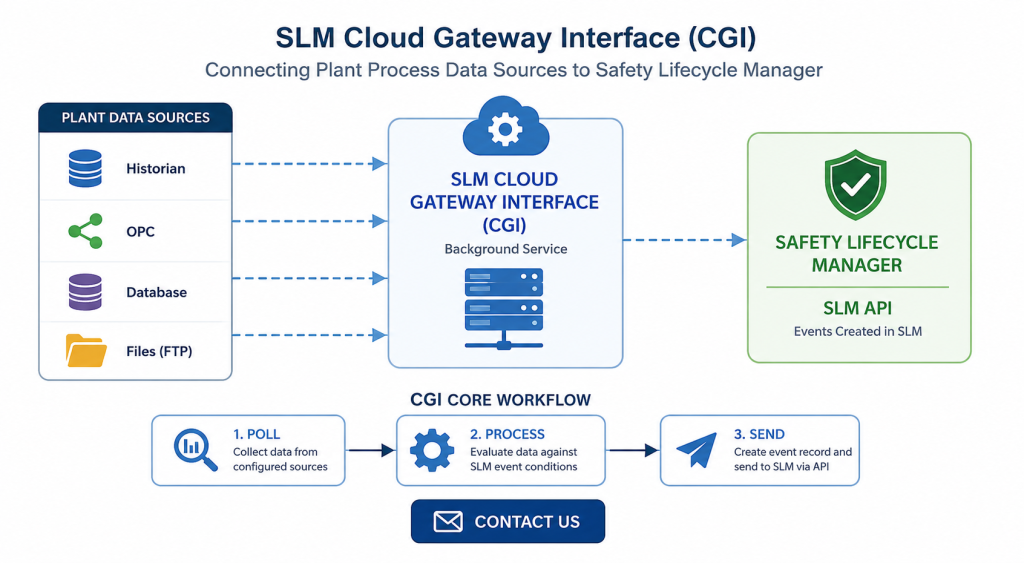
How the SLM Cloud Gateway Interface Polls, Processes and Sends Data
The fundamental SLM Cloud Gateway Interface workflow can be divided into three stages: polling, processing and sending.
- CGI collects data from the configured historian, OPC source or other supported repository.
- The collected data is processed against event conditions obtained from SLM.
- When CGI identifies a qualifying event, it creates an event record in a temporary buffer.
- The processed event is then sent through the SLM API.
- The API provides the interface used to create the corresponding event within the SLM instance.
SLM Cloud Gateway Interface Configuration
The web-based SLM Cloud Gateway Interface includes application and plugin settings that are configured according to the individual deployment and data source. These settings control important elements of polling, processing, authentication, event transmission and maintenance.
Configuration options demonstrated in the CGI training include:- Authentication type and credentials
- CGI URL
- Temporary-data cleanup settings
- Customer and instance identification
- Debug settings
- Error notification email
- Log retention
- Authentication key name and key value
- Last runtime
- Microprocessing
- Historical polling offset
- UTC and server time-zone offsets
- Plugin selection
- Tag polling
- Bad-tag handling
- Scan interval
- Historical or live scan type
- Automatic sending to SLM
- SLM timeout
- SLM API key and API URL
- Data-source configuration
- Tag filtering
- Data-source username and password where required
Configuring Historian Events for the SLM Cloud Gateway Interface
CGI relies on event configuration in SLM to determine what conditions in the incoming process data should result in an event. The training demonstrates configuration for bypass, demand and fault events associated with a Safety Instrumented Function.
Within the SIF Historian configuration, the required event types are first enabled. Events can then be added individually or synchronized with the relevant components.
An event configuration can include information such as:
- Whether the event is enabled
- Server configuration where applicable
- Historian tag name
- Comparison operator
- Activation value
- Reset value where applicable
- Associated SIF or component
For example, a bypass can be configured so that a tag value equal to 1 represents activation and a value equal to 0 represents reset. CGI evaluates changes in that process value and identifies the corresponding event condition.
Importantly, the event is based on the change in state. A value remaining constantly at 0 or constantly at 1 does not repeatedly create the event. CGI evaluates the transition between configured states.
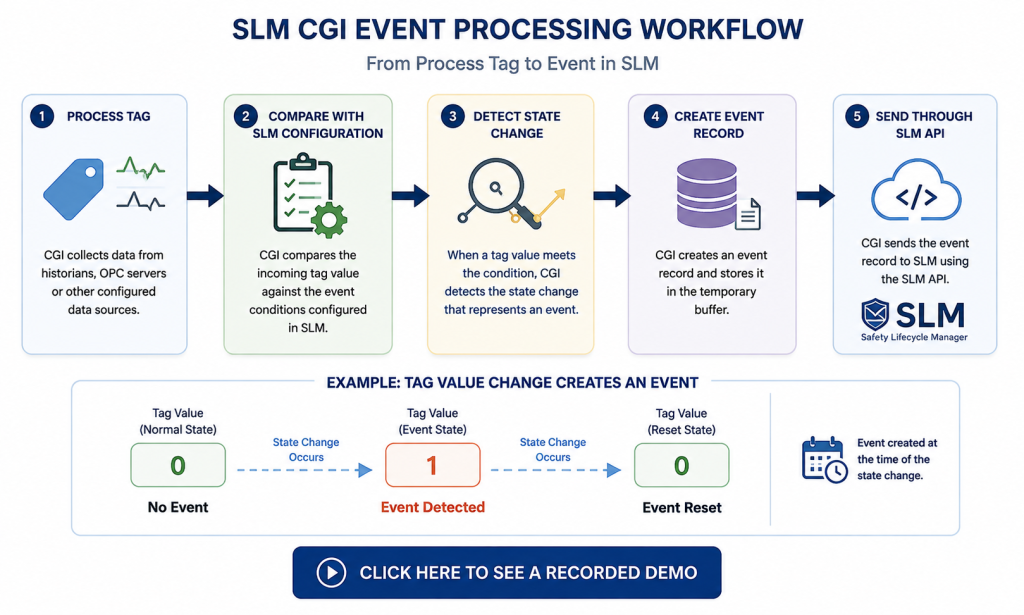
Retrieving CGI Configuration Through the SLM API
The CGI configuration used by the service is available through the SLM API. Within CGI, the EDA Config area contains configuration retrieved from SLM, including the tags that CGI uses during processing.
Configuration can be refreshed from CGI or retrieved through an API GET request. The training demonstrates this process using API testing tools and shows the returned configuration as JSON data.
The configuration payload can contain information including the event name, event type, application object reference, tag information, comparison operator, comparison value and whether the configuration is enabled.
CGI then uses this configuration when evaluating process data. It compares the tag received from the historian or other source with the configured event tag. When the tag matches, the value is evaluated against the configured condition to determine whether an event transition has occurred.
Microsoft’s ASP.NET Core authentication documentation provides additional technical background on authentication schemes and bearer-based authentication used by ASP.NET Core applications.
Data Sources, Protocols and CGI Plugins
The SLM Cloud Gateway Interface can accommodate different types of plant data sources. These may provide historical data, live data or file-based data depending on the site and integration architecture.
The training identifies supported integration approaches including:
- PI Web API
- OPC Classic
- OPC UA
- OPC Classic Live
- File passing
CGI uses plugins to accommodate the different source types. The appropriate plugin is selected through the CGI configuration so that the service can communicate with the required source.
File-based integrations may require an FTP transfer or another process that places data into an accessible folder. Other sources can communicate through technologies including OPC, Web APIs and WebSockets.
The network architecture depends on where CGI and the data source are located. The training describes deployments where process data may originate from a control network or enterprise business network, with CGI positioned within a DMZ or another appropriate network location. Firewall requirements therefore depend on the deployment architecture.
Sending Process Events to SLM
Once the SLM Cloud Gateway Interface identifies and processes an event, the event can be sent to the SLM API. The API provides the interface used to create the corresponding event within the SLM instance.
The event payload demonstrated in the training contains information such as:
- Process event name
- Application object reference for the associated SIF
- Event type
- Primary tag where applicable
- Event operator and comparison value where applicable
- Timestamp indicating when the event occurred
A successful API request returns an HTTP success response together with information about the created event. Depending on the event, this can include information such as its activation date, source and duration.
CGI can also be configured to buffer an identified event before transmission or automatically send processed events to SLM as part of its normal workflow.
SLM Cloud Gateway Interface Logging and Maintenance
CGI includes several logging functions to help administrators understand application activity and troubleshoot data-processing problems.
The general logs provide visibility into application activity and can be filtered to review informational, error and debug information. When debug mode is enabled, additional detail is generated to show individual steps occurring within the system.
Process logs focus specifically on data polling. If CGI encounters a problem while retrieving or processing source data, these records can help administrators investigate the polling workflow.
CGI also includes maintenance functions for temporary data, event information and accumulated logs. Automatic cleanup can be configured for temporary data after a defined record threshold is reached, while log-retention settings determine how many records are retained before cleanup occurs.
Administrators can also manually delete general and process logs where required. Because enabling debugging can generate a substantial volume of log data, debug logging should be used deliberately when investigating a problem rather than treated as the normal operating state.
For broader application administration tasks, see the SLM Application Maintenance guide.
Together, these functions give administrators visibility across the complete CGI workflow: collecting source data, processing configured event conditions, transmitting events to SLM and investigating problems when the expected workflow does not complete successfully.
SLM-CGI Overview
0:06
Welcome to this IT Explainer video, part of our integration topic range.
0:10
In this video, we’ll cover the subject of CGI within SLM.
0:16
This technical overview will cover the installation and usage of the SLM Cloud Gateway interface.
0:22
The CGI is a background service that is created to provide data integration service between a variety of historical data sources and the SLM, the Safety Life Cycle Manager.
0:35
It’s three primary functions to poll data, to process data, and to send data.
0:41
The following information will be covered in this training.
0:44
CGI overview.
0:46
Web development configuration.
0:49
CGI workflow configure historian tags in SLM configuration for SLM, polling historian data, processing data, sending data to SLM, testing functions, data exports, logging and debugging and maintenance.
1:13
In chapter one we’ll be covering what is CGI, how does CGI work and technologies used.
1:20
CGI is an application which provides data integration between multiple sources of plant process data and SLM.
1:29
Data sources can be from OPC servers, data historians, relational databases or FTP files.
1:37
CGI gathers data and looks for events within the raw data based on pre configured conditions set by SLM for each data point.
1:46
If a data point matches the required value and condition, an event record is created and sent to SLM via the SLMAPICGI is built in asp.net Core platform so run on Windows or Linux operating systems.
2:01
It can run within the Azure cloud container or locally within a Docker container environment.
2:07
Communications between CGI and SLM is accomplished through Restful API.
2:12
Communication between CGI and the data source is through OPC, Web API and Web Sockets.
2:19
Multiple plug insurance have been developed to accommodate the variety of data sources.
2:26
In Chapter 2, we’ll cover creating an Azure instance, deploying from Visual Studio, setting up the database via FTP and running the application.
2:38
To create ACJ instance on Azure portal, we’ve got to App Services.
2:47
Create web app, pick our resource, we give it an application name, SLM CGI demo, pick how we publish code, docker container or static web app.
3:12
We choose Net Six as our deployment on Linux.
3:19
Choose South Central US as the region.
3:24
Our pricing plan is free for now.
3:30
Review and click Create.
3:37
It’s now completed successfully.
3:39
Go to your resource which shows your application.
3:46
There’s the address for it right there, just waiting for your code.
3:57
Let’s now download the profile.
4:02
Save it somewhere where you can easily find it.
4:05
Go to Visual Studio, create a new profile.
4:10
Import the profile.
4:17
Under Download, click the profile that you’ve downloaded.
4:26
When you’ve finished, it should be in your profile list.
4:32
We’ll do the demo using Zip Deploy.
4:36
Hit Publish.
4:40
Once published, you’ll bring up your website.
4:45
The CGI runs on a local database, so it’d have to be FTP D to the website before it actually works.
4:53
To get your credentials in Azure you go to the deployment centre FTP credentials.
5:02
After you record that information you can create a profile and do your favorite FTP client.
5:08
I’m using FileZilla.
5:10
Enter the information and click connect.
5:16
There should be a folder called Data.
5:18
If there’s not, you need to create one and then copy your CGI data SQL Lite file to that directory.
5:27
Your CGI application runs on Azure, so you can go to the portal and you see the default domain right here.
5:36
You click on it.
5:38
OK, that’s started.
5:41
You can go back to your portal and stop and restart the website any time the application on the main page has status or logs.
5:55
It also has the Hangfire dashboard where it will run all the background processes.
6:01
So recurring jobs or any current jobs will be listed in here.
6:07
On the top menu you have your EDA configuration.
6:12
So these are the configurations in your SLM history, your data engine.
6:18
This is where it gets the data from PY or some other sources.
6:22
Your events, these are the events that are found, for example, trips and bypasses.
6:29
The logs menu contains your logs for any kind of debugging errors.
6:35
Process logs are actually the logs for all of the data that’s been pulled from PY and so on.
6:41
So if there’s any issues, you can see it here.
6:43
Setting will allow you to see all of your settings.
6:45
You can create new ones if needed.
6:49
Swaggers for testing.
6:51
So this is for the API testing, getting to each of the actual calls directly.
6:56
The login is required for any kind of changes that you want to make.
7:03
For view only, you don’t need to login.
7:09
In chapter 3 we will cover application settings and plug in settings.
7:14
The web-based CGI has some settings that need to be configured for each client.
7:19
The first authentification type we see here is bearer token.
7:22
So depending on the type you set the auth ID or auth security, also which URL and if you need to grab any authentification.
7:30
CGIURL is a reporting application API, this doesn’t need to be changed.
7:35
Clean up data is true means any temporary data will be deleted clean up minimum.
7:41
So it would only start the data clean up at a minimum of 1000 records.
7:46
Customer ID This would identify the customer CGI ID for for reporting purposes.
7:53
Debug typically is turned off.
7:55
When you turn it on it would actually create a debug file to see if you have any issues.
7:59
e-mail to This is the e-mail that all errors are sent to.
8:05
For error wait this is a pause.
8:07
Is typically set to false instance name.
8:11
This is for the reporting so that you can tell which log it’s for.
8:14
Keep logs is how many logs before it starts deleting them.
8:19
Key name and key value.
8:20
This is for the authentication above.
8:22
Here depending on the type, bare token will use the key name and the key value.
8:27
Last runtime gives you an idea when the data polling last run.
8:31
So microprocessing when turned on processes the data after each call.
8:35
The offset is during polling, it would take today’s date and time and it goes back historically on that offset.
8:42
So if it’s a 24 hour offset, it means you’ll gather data up until yesterday.
8:46
This is to prevent you from grabbing today’s data since it could change.
8:50
For some sites it doesn’t change.
8:51
For some sites it will change because the data has a delay.
8:55
So you might not be getting any data back.
8:57
Offset from UTC.
8:58
This is based on what time zone you’re in.
9:01
So this lets the software know that you’re -6 or plus six hours from UTC.
9:06
This password is for authentication on some data sources that require a username and password.
9:10
This is the name of the plug in that it should load.
9:13
So we have different types of plug in and this is where you’ll tell the system which plug insurance to load poll tags.
9:18
This being true, it will start polling.
9:21
If it’s false, then the system will not poll for tags.
9:24
Some sources don’t have tags, so this will be set to false.
9:27
Save bad tags.
9:28
So when the system is pulling tags from SLM, it’ll either save the bad tags, which are basically tags that are not completely filled out or missing properties or so on scan interval.
9:39
This shows in minutes, so every 60 minutes it will scan for data scan type, either historical or live data send to SLM.
9:51
After an event is found it will leave a buffer until someone manually sends it or automatically sends it.
9:57
Turns to true, will automatically send it server time zone.
10:01
This is if the server is not the same time zone as the data source.
10:05
So typically it’ll be 0.
10:06
This is just time out.
10:07
This is for SLM time out.
10:09
So once it gets an event, it will connect to SLM and create an event.
10:12
It’s 120 seconds for the time out, so 2 minutes.
10:15
The SLM key, this is the API key.
10:19
The SLMURL, this is the API address for each instance, the source.
10:23
For example, let’s say π is the source and you’ve got a π server name and then a source list essentially goes behind the original source.
10:32
So once you hit the server it will go through each of these sub addresses.
10:36
Tag filter.
10:37
This is used for filtering tags.
10:39
If there are certain tags that are only used to look at data coming from SLM you can put a filter on.
10:44
If not just leave it blank.
10:46
Username that goes with the password above.
10:48
So some systems require a username and password.
10:56
In chapter four, we will cover polling data, processing data, and sending data.
11:01
The first portion of the workflow is the data collection.
11:06
So we collect data from any type of historian, either a Pi data source, an OBCHDA, or some type of file repository.
11:19
Once the data is collected, it will begin being processed.
11:23
It is looking for either a change in event or any kind of status inside the tag to show that an event has occurred.
11:31
Once it sees that event, it will create a record, a temporary buffer that holds the record of events.
11:37
Those events are then sent after it’s being processed or will be sent as part of a cycle.
11:43
The data event that’s found will be sent to SLMAPI.
11:47
The API gives us an interface to create the events within the SLM instance in the database.
11:57
In Chapter 5, we’ll be covering bypass events configuration, demand events configuration, fault event configuration, and pulling configuration from SLM to CGI.
12:09
To configure the events for your SIF, first pick the SIF that you’re going to configure.
12:16
Go to the Historian tab.
12:19
You need to 1st enable the events that you want to configure.
12:24
So here we’re going to enable all three.
12:26
Hit save and now they should all be enabled.
12:30
You can add the events manually or a quick way is to synchronise all of the components.
12:35
This will Add all the events for you.
12:38
Once the events are added you can enable them, so here’s a bypass event.
12:45
We can add any server configuration so point to the name of the server.
12:50
If not, you can leave it blank.
12:52
Enter the tag name for that particular event.
12:59
Enter the compare value.
13:02
So if the value is equal to 1, it will be activated.
13:07
If it’s equal to 0, it will reset.
13:11
Hit save.
13:15
For a demand event, it’s the same.
13:17
Enable the demand configuration.
13:22
Use Is an event server if you have one.
13:26
If not, leave it blank.
13:28
Then enter the tag name.
13:39
Enter equals for the compare and a value of 1.
13:43
There’s no reset for activation tags, so just click on save for a full.
13:51
If there’s not a component, it obviously won’t bring it in, but you can have one manually.
13:58
Let’s give it a component name, click enable, same as the bypass it’s enter the tag name, give it a compare value and an activation value, a compare value and a reset value and hit save.
14:28
That should all be set up now.
14:31
So if we come back to the CGI service page, the SLM configuration that’s being used by CGI is under this menu called EDA Config.
14:40
If you click browse, it will bring up all the existing tags that are in the system that we pulled from the SLMAPI.
14:50
To refresh, you can click on retrieve config here, which will run in the foreground.
14:57
Or you can go to the Swagger sample and perform a GET command from here.
15:08
In chapter 6 we’ll be covering GET config call to API configuration format and how it is used.
15:15
The CGI configuration is available via the API on your SLM instance.
15:22
By using the Postman software we can see how it actually works.
15:28
So the command is a GET command server name slash API CGI config variable offset tells you the starting point and the limit is how much to pull.
15:43
When you hit send, it will send the command.
15:46
When the data comes back, you’ll have a status 200 shown.
15:49
All is.
15:49
Well then here’s your data payload.
15:54
That’s a Jason format.
15:56
So the first item is the name, the name of the actual configuration of the bypass.
16:02
So this is a bypass.
16:03
The event type down here tells you it’s a bypass.
16:08
The date time is the time of polling application object reference.
16:13
This is the reference of the SIF hashtag.
16:17
The primary tag is also the same as the event tags.
16:21
This is used for a different purpose.
16:23
So the one we’ll be using is the event tag.
16:28
It has the tag name, the EQ for equal as the event operator.
16:35
The comparison value is 1, so if we see a one, we’ll recognize it as an event of bypass.
16:48
Also the configuration is enabled.
16:54
Let’s look at this one.
16:55
This one is a bypass reset.
16:57
It has RST in the name but also the type.
17:01
The event type is 11 and the same for the other application reference.
17:08
The only difference is the comparison value.
17:10
So same tag except we are saying this is equal to 0.
17:17
So the way all this is used is it compares each process tag that gets from, let’s say your historian, such as π that compares that tag name to this one.
17:31
If there’s a match, then it uses the value of that tag and then compares to see which one it equals, either A1 or A0.
17:40
The comparison is only during the change from 1 to 0 and 0 to one.
17:46
The event is not created if the value remains a constant zero or a constant one.
17:51
It’s only during a change.
17:56
In Chapter 7, we’ll be covering different source types, data protocols, data security, and the plug insurance that are available, the Pi Web APIOPC, Classic OPCUA, and file passing.
18:11
So one type of data storage is from a historian.
18:14
That historian could be, let’s say APIs server, or it could be an OPC server that also stores historical data.
18:22
The other type is live data.
18:25
So live data can be pulled from OPC server or Modbus or any other source from the plant.
18:32
The sources would then determine which data protocol will be in use.
18:36
So the data protocol is between this section and this section.
18:40
Here the protocol could be just plain text, encrypted text, or any other type of binary communication.
18:50
The protocol on this end is plain Http://text.
18:54
That’s under secure SSL.
18:57
For data security, there should be a firewall between your data source and your CGI.
19:06
If it’s on the web, the security is a lot less, but otherwise your data source will be on the control network or the enterprise Business Network.
19:16
Your CGI could sit somewhere on the DMZ or it could actually sit outside.
19:21
The firewall here between the CGI and the SLMAPI only exists if the CGI is sitting on the customer’s internal local area network.
19:32
If they’re both on the web, then there is no firewall.
19:35
Now for the plug insurance that we have in the CGI to handle all of these different sources, we have a Pyware API plug in.
19:42
We have two types of OBC plug in for classic and UA.
19:46
We can do file passing and then we can also do OPC Classic Live.
19:51
If there is file passing, it will require FTP transfer or some type of data dump to a folder.
20:00
In Chapter 8 we’ll be covering SLMAPI for events, data payload and response types, success warnings and errors.
20:09
So if we look at the sending of events to the API from the CGI in detail, so it’ll be this section down here.
20:21
So in this example, we can show the Postman software using the function to send bypasses.
20:26
So the URL will show that the endpoint is a CGI event on your API.
20:30
For your instance in the body, you need the process event name.
20:38
You’d need the application object reference, which is the hash ID for that SIF.
20:45
The type of event here is a 10 which is a bypass, The primary tag, which is not necessary but optional.
20:56
The event operator and the event compare that’s also optional.
21:02
The timestamp when the event happened that is required.
21:07
We hit send, we get a response.
21:13
The status is 200, which means it’s good.
21:16
You can also see it here.
21:18
The response code for it saying that it’s been successfully run shows the activation date, where it came from, which is the CGI, how long it’s been in bypass.
21:36
That number is also based on the reset.
21:43
In Chapter 9.
21:44
We’ll be covering general logs, error logs, debug logs, and process logs.
21:50
The Ctr.
21:51
has a set of login functions to help you troubleshoot any issues.
21:54
For example, on this front page here you’ll see the current log that just came in.
22:00
So this is just a quick overview to get a better look.
22:05
You can go to logs and then all this will show you all the logs that have occurred.
22:12
Or you can filter so these are informational logs only, error logs only and debug will show every log, every step that occurred in the system.
22:29
As part of a debug you can also go to the process logs.
22:34
This will show the logs for the polling of data.
22:37
So any polling issues would show up in here.
22:44
In chapter 10 we’ll be covering temp data, logs and event lists.
22:51
So the CGI has a lot of built in features for maintaining items like temporary data and logs and events.
22:58
So first we can look at the settings themselves.
23:03
If you want temp data automatically cleaned up, you would set this to true and this is how many records before it would start cleaning up.
23:10
So it needs to hit 1000 records before it will start cleaning up.
23:14
So also in the logs.
23:16
If you don’t want too many logs in the system, turn this off.
23:21
Setting debug to true is going to create a lot of logs.
23:25
So here we have the same thing for the logs.
23:28
Just like in clean up data we have a log minimum.
23:31
You can’t turn off the clean up log because it generates so many logs.
23:36
Here you can set how many logs you can keep.
23:38
Right here it sets 10,000.
23:42
The other way is cleaning up the logs is in here you can delete all logs.
23:48
For example, right now we have these logs, we’ll delete those logs.
23:54
So now all the logs have been deleted.
23:56
But of course, it’s running system, so new logs have just come in.
23:59
But there’s only 81 in there right now.
24:03
You can also delete the process logs.
24:05
So these are your process logs.
24:08
Click Delete process logs.
24:12
That’s now empty and it’s not actively collecting data at this minute.
24:18
We can see the regular log has already gone up to 365.
24:21
This is just because of the debugging.


