
LOPA Conditional Modifiers
LOPA Conditional Modifiers improve the consistency and accuracy of Layer of Protection Analysis (LOPA) by standardising probability values that influence the consequence of a hazardous scenario. Rather than estimating these values during every study, organisations can define approved conditional modifiers once and reuse them across multiple HAZOP and LOPA assessments.
Safety Lifecycle Manager (SLM) allows administrators to create global conditional modifiers at either the Enterprise or Site level, ensuring consistent probability values are applied throughout the organisation. This reduces facilitation time, improves calculation accuracy and supports a standardised risk assessment methodology.
This guide explains what LOPA Conditional Modifiers are, how they are configured, synchronised across sites and applied during HAZOP and LOPA studies.
What Are LOPA Conditional Modifiers?
LOPA Conditional Modifiers represent probabilities that affect the likelihood of a hazardous consequence occurring once an initiating event has taken place.
They are used within Layer of Protection Analysis to improve the realism of risk calculations by accounting for factors that influence whether a consequence will actually occur.
Using predefined conditional modifiers helps organisations:
- Standardise probability values.
- Reduce calculation inconsistencies.
- Improve LOPA accuracy.
- Reduce facilitator workload.
- Apply company-approved values consistently.
To learn more about Layer of Protection Analysis, see our Layer of Protection Analysis (LOPA) guide.
Configuring LOPA Conditional Modifiers
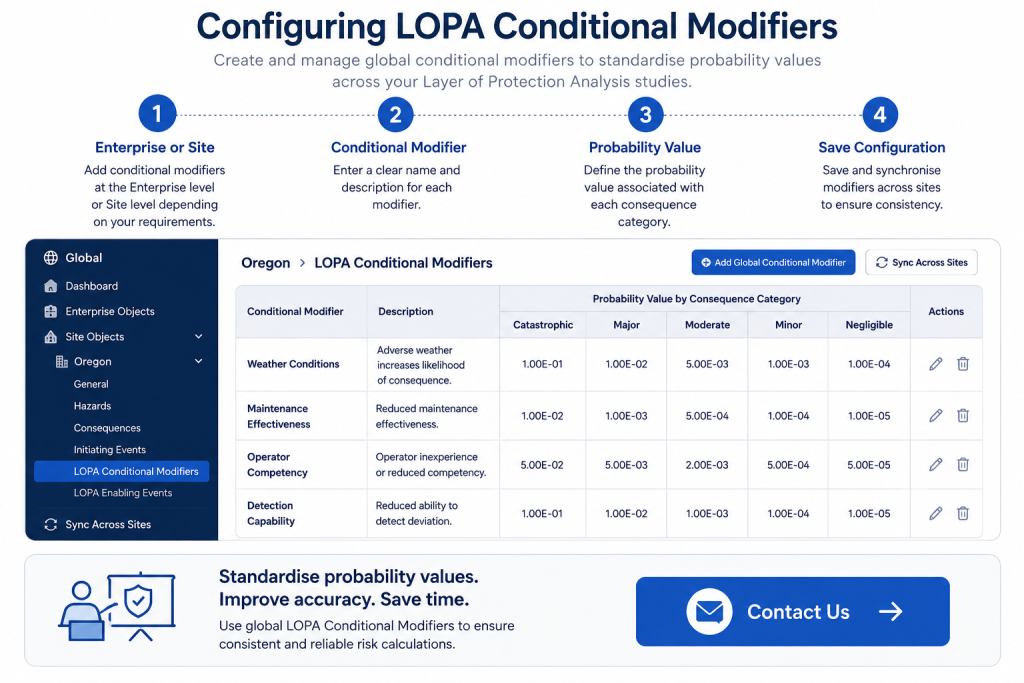
LOPA Conditional Modifiers are configured within the Global module of Safety Lifecycle Manager.
Administrators can create global modifiers at either the Enterprise level or the Site level depending on how the organisation manages probability values.
- Create new conditional modifiers.
- Enter descriptions.
- Assign probability values.
- Maintain standard company values.
If all facilities share the same values, Enterprise-level conditional modifiers can be used. Where individual sites require different values, Site-level modifiers provide greater flexibility.
Enterprise and Site Synchronisation
One of the key advantages of LOPA Conditional Modifiers is the ability to synchronise approved values throughout the organisation.
Safety Lifecycle Manager allows administrators to:
- Synchronise Enterprise modifiers across all sites.
- Synchronise Enterprise values to individual sites.
- Maintain site-specific probability values where required.
This approach helps ensure every LOPA study uses consistent, approved probability data while still allowing flexibility for site-specific requirements.
If consequence categories differ between Enterprise and Site configurations, some probability values may require manual review before synchronisation.
Applying LOPA Conditional Modifiers
LOPA Conditional Modifiers can be applied directly within both HAZOP studies and LOPA worksheets.
To apply a global conditional modifier:
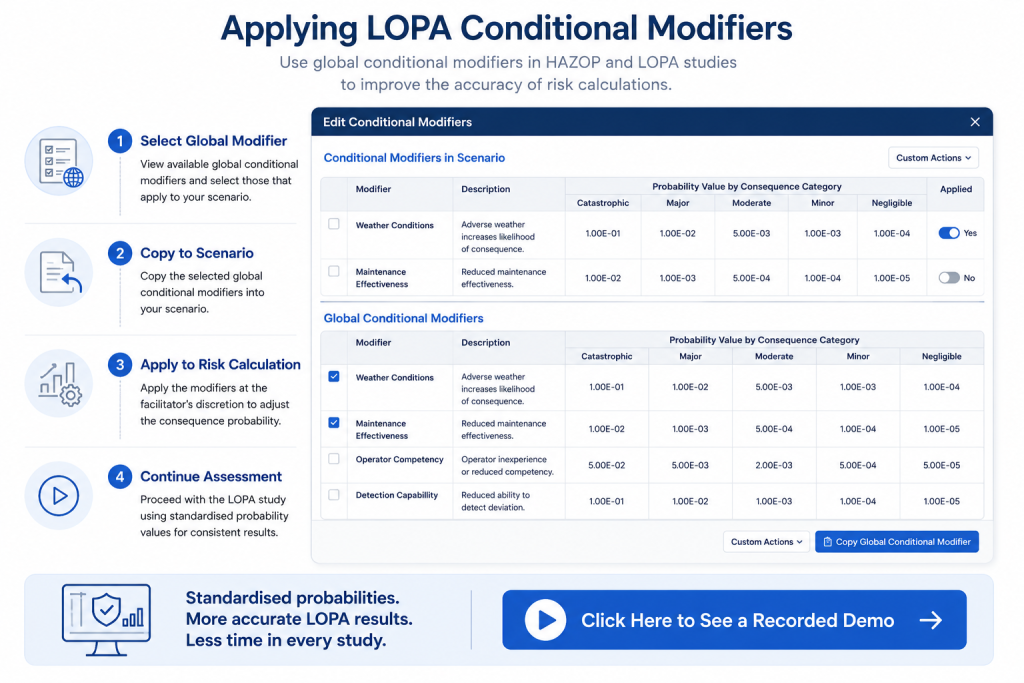
- Open the required HAZOP scenario or LOPA worksheet.
- Select the Conditional Modifiers section.
- Choose the required global modifier.
- Copy the modifier into the local assessment.
- Apply the modifier to the scenario.
Once copied, the modifier becomes part of the local assessment and can be used during risk calculations.
Using Conditional Modifiers in HAZOP and LOPA
Although primarily associated with Layer of Protection Analysis, LOPA Conditional Modifiers can also be used during HAZOP studies.
This allows organisations to maintain consistent probability values throughout the hazard identification and risk assessment process.
Using the same approved values across multiple study types helps:
- Improve consistency.
- Reduce transcription errors.
- Support repeatable risk calculations.
- Simplify facilitation.
Because modifiers are centrally managed, facilitators no longer need to calculate or estimate values during every workshop.
Benefits of LOPA Conditional Modifiers
LOPA Conditional Modifiers help organisations standardise probability values across every Layer of Protection Analysis study.
Key benefits include:
- Consistent probability values.
- Improved calculation accuracy.
- Faster LOPA facilitation.
- Enterprise-wide standardisation.
- Reduced manual data entry.
- Improved auditability.
By centrally managing conditional modifiers, organisations can significantly improve both the quality and consistency of their risk assessments.
Learn more about the Layer of Protection Analysis Module.
Related LOPA Resources
If you’re performing Layer of Protection Analysis studies, these related guides may also be useful:
- Layer of Protection Analysis (LOPA)
- LOPA Calculations
- LOPA Generic Enabling Events
- LOPA Facilitation
- Safety Integrity Levels (SIL) Explained
For additional guidance on Layer of Protection Analysis methodology, visit the AIChE CCPS LOPA resource.
Conditional Modifiers
0:06
Welcome to this application Explainer video, part of our global topic range.
0:10
In this video, we’ll cover the subjects of low per conditional modifiers in SLM.
0:16
Like enabling events, conditional modifiers can be used to accurately assess and portray the risk for a given scenario or hazard and typically take on the value of probability associated with the consequence.
0:30
The following information will be covered in this training.
0:32
Chapter one will be conditional modifier overview and Chapter 2 will be application within the PHA study.
0:42
In Chapter 1 we will cover the purpose of the global conditional modifiers, creating a new global conditional modifier and syncing between the enterprise and the site whilst conducting a LOPA.
0:55
It is often the case that conditional modifiers may need to be considered while trying to properly assess and reduce the risk of a hazard occurring for a given scenario.
1:04
It is possible that these values can be used inconsistently due to calculations being made on the spot or a transcription of errors from company or facility predetermined values.
1:15
To address this, SLM provides a way to standardise all probability values for conditional modifiers across the entire facility at the site level or company at the enterprise level if needed, based on predetermined values established by the company.
1:30
Once these global conditional modifiers have been created, they can easily be applied to any PHA, cutting down on facilitation time and increasing accuracy in scenario calculations.
1:42
Conditional modifiers can be added at the Enterprise or Site objects depending on the level of granularity needed.
1:51
If conditional modifiers will be standard across all sites in the company, the global conditional modifier should be added at the Enterprise level.
1:59
If the type and value for the conditional modifiers differ from site to site, global conditional modifiers should be added at the Site level.
2:07
To add conditional modifiers in the Global module, click on the Enterprise Oregon Site Objects Low per Conditional Modifiers tab and add Global Conditional Modifier.
2:19
Here you can enter in the modifier, its description, and the probabilities.
2:25
To copy global conditional modifiers from the enterprise to be applied across all sites on the Enterprise level, click on Sync Across Sites.
2:34
To add it to one particular site, navigate to the Site object.
2:39
Click on Low per Conditional Modifiers tab and then click Sync with Enterprise.
2:46
This brings down the conditional modifiers and their probabilities from the enterprise to add to the current list at the site.
2:54
However, note that if the consequence categories are different at the site than at the enterprise, then the probabilities may not be copied down.
3:06
In Chapter 2, we’ll cover applying global conditional modifiers to the HAZOP study and applying global conditional modifiers to the LOPA study.
3:15
In SLM, Conditional modifiers can be applied to scenarios in both the HAZOP and the LOPA module in a similar way.
3:22
To proceed, in the HAZOP module, navigate to the desired HAZOP study and node on the Facilitation tab, scroll to the Conditional Modifiers section in the scenario.
3:41
Click the Edit button to view a list of conditional modifiers for the scenario in the top section and conditional modifiers from the Global module in the bottom section.
3:53
Check all conditional modifiers to be applied to the scenario and under Custom Actions, click Copy Global Conditional Modifier.
4:07
Scrolling up shows that the new conditional modifier has been copied from below and is applied to the scenario to proceed in the local module, navigate to the Local module, expand the object tree to navigate to the desired local worksheet, and on the Applicable Values tab in the Initiating Courses section in the Custom Actions menu, click on Manage Conditional Modifiers, which will show a light box with the same information as mentioned previously in the Hazop module.
4:42
Once again, the top section being which conditional modifiers are part of the scenario and the bottom section being your conditional modifiers listed in the Global Conditional Modifiers section.
4:55
Check all conditional modifiers that apply and under the Custom Actions menu, click on Copy Global Conditional Modifier.
5:06
Scrolling up shows that it makes a copy of that conditional modifier, which can then be applied to the local worksheet or scenario for both Hazop and local modules.
5:23
Once the conditional modifiers are listed in the top section, they can be applied at the user and facilitator’s discretion, as shown here with the Yes value.


