Equipment Category & Type
Equipment Category & Type allows organisations to create standard classifications for major process equipment within the SLM Global Module. Defining consistent equipment categories and types ensures equipment is classified uniformly across the organisation while supporting more efficient HAZOP studies and equipment management.
Equipment definitions can be created at either the Enterprise or Site level and synchronised across multiple facilities where required. Once configured, users can assign these standard classifications to equipment records, helping ensure the correct process deviations are associated during hazard studies.
This guide explains how to configure Equipment Category & Type libraries, synchronise classifications across sites, and use them to improve equipment consistency and HAZOP facilitation within SLM.
What Is Equipment Category & Type?
Editing and Managing SLM Projects showing a controlled check-in workflow from project review and approval to production deployment provides a standard method of classifying major process equipment within SLM. By defining consistent categories and equipment types, organisations can ensure that equipment is identified uniformly across every site while supporting HAZOP studies and other process safety activities.
Rather than creating equipment classifications individually for every project, administrators can build reusable libraries that are available throughout the organisation. This improves data quality, reduces duplication and simplifies equipment management.
- Standardise major process equipment classifications.
- Improve consistency across Enterprise and Site objects.
- Support HAZOP facilitation.
- Reduce duplicate equipment definitions.
- Improve reporting and data quality.
Learn more about enterprise configuration in the System Module Global Configuration guide. Organisations using the SLM Global Module can centrally manage equipment classifications across multiple facilities.
Equipment Category & Type Configuration
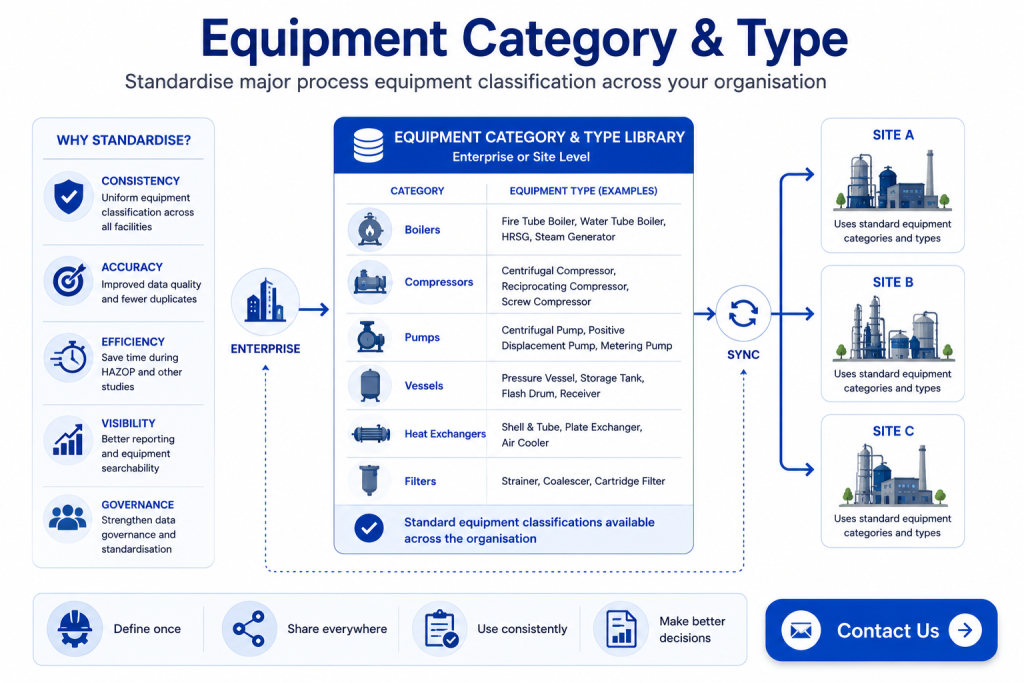
Equipment categories and equipment types are created within the Global Module using simple text-based definitions. Administrators can add new categories, define the associated equipment types and build a standard library that can be reused throughout the organisation.
Typical equipment classifications may include boilers, compressors, pumps, heat exchangers, vessels and other major process equipment used during hazard studies.
- Create equipment categories.
- Add one or more equipment types within each category.
- Maintain a consistent equipment library.
- Expand classifications as new equipment is introduced.
Once created, these classifications become available for equipment records throughout SLM.
Enterprise and Site Synchronisation
Equipment classifications can be managed at either the Enterprise or Site level depending on organisational requirements. Enterprise libraries are ideal when equipment standards are shared across multiple facilities, while Site-level configuration provides flexibility for local variations.
SLM also allows Enterprise libraries to be synchronised to every Site, reducing administrative effort and ensuring consistent equipment classifications across the organisation.
- Maintain company-wide standards.
- Synchronise equipment libraries across Sites.
- Reduce duplicate administration.
- Support consistent equipment naming.
Equipment Category & Type for HAZOP Studies
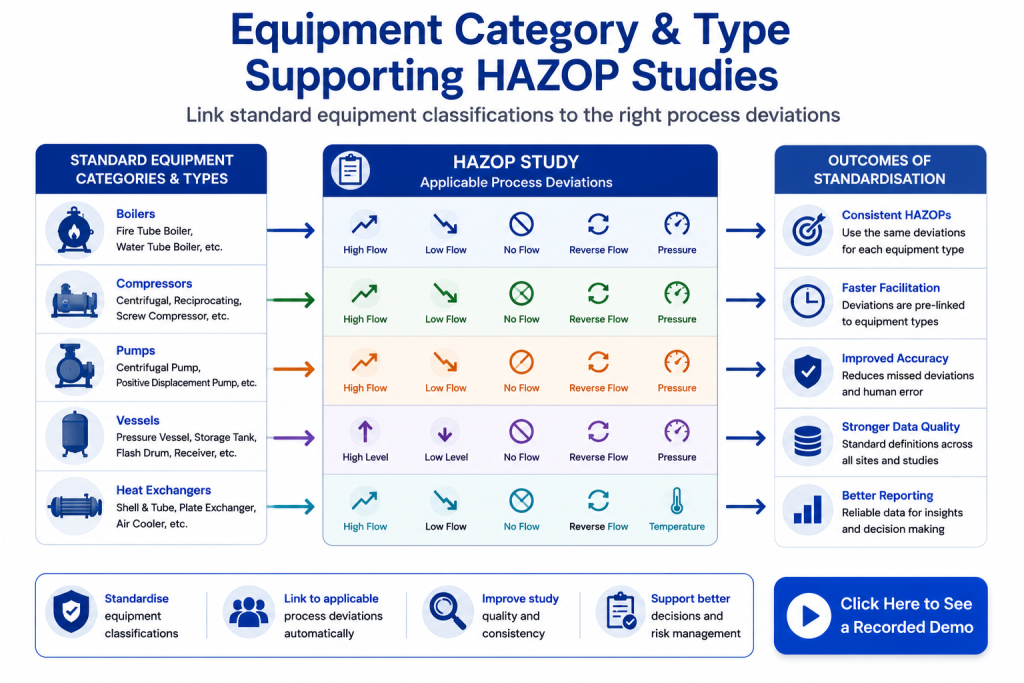
Equipment Category & Type definitions play an important role during HAZOP studies. Once equipment has been classified, SLM can associate the appropriate process deviations with each equipment type, helping facilitators identify relevant guidewords and scenarios more efficiently.
For example, a boiler, compressor or vessel may have different applicable process deviations. By maintaining standard equipment classifications, these relationships can be reused throughout future studies, improving consistency and reducing manual configuration.
Learn more about managing Global Standard Process Deviations, which work alongside equipment classifications during HAZOP facilitation.
Managing Equipment Categories and Types
Once standard classifications have been created, users can assign Equipment Categories and Types when creating or editing equipment records. These fields provide a consistent way to identify equipment while supporting reporting, searching and hazard analysis.
Additional information such as equipment identifiers, names and physical asset descriptions can also be maintained alongside the selected category and type, creating a comprehensive equipment register within SLM.
Benefits of Standard Equipment Classification
Maintaining standard Equipment Categories and Types improves both data quality and process safety workflows across the organisation.
- Improve consistency across facilities.
- Reduce duplicate equipment definitions.
- Support faster HAZOP facilitation.
- Improve reporting and equipment searches.
- Strengthen data governance.
- Simplify long-term maintenance of equipment libraries.
Related Global Module Resources
Continue learning about equipment management and Global Module configuration with these related resources:
- System Module Global Configuration
- Global Standard Process Deviations
- Global Personnel Configuration
- SLM Global Module
For additional guidance on process hazard analysis and equipment management, visit the AIChE Center for Chemical Process Safety (CCPS).
Equipment Category & Type
0:06
Welcome to this Application Explainer video, part of our SLM Global topic range.
0:11
In this video, we’ll cover the subject of equipment category and types within SLM.
0:17
Within the SLM Global module, users will need to define the different categories and types of the major process equipment.
0:28
Within the SLM system, users can define specific pieces of major process equipment and house them within the system and relate them to other objects.
0:39
Now within the SLM system, we need to build a definition for the different categories and types of that major process equipment.
0:47
So at the site level or at the enterprise level, we can go to the standard Process Deviation tab and underneath the standard process deviation list, there is another table here for the different equipment types template.
1:03
And from here we can select a different category and type for different pieces of major process equipment like boilers, compressors, whatever it may be.
1:13
We can simply add new ones by adding a new category.
1:18
It’s an open text field, so we can type in there.
1:20
We can then type in the type of equipment and they will be stored in here.
1:26
Now, from the enterprise object, we can simply hit the Sync across Sites button.
1:31
That will simply push down the equipment categories and types to all the different site levels so that the equipment within those sites can be using these classifications.
1:41
Now within a site level object, we can go to the same standard process deviations tab and again, we’ll be able to look at the different pieces of equipment here and we’ll be able to understand what deviations may apply to those different pieces of equipment for linkage.
1:57
So a boiler fire tube, does it have low flow, higher flow, no flow, reverse flow?
2:03
We can simply click in here and save.
2:06
This will automatically then associate the equipment with those different types of process deviations when you’re facilitating your HAZOP study.
2:15
Now on the pieces of equipment, as you build them out, you’ll be able to edit information around them like their ID number, equipment name, physical equipment name.
2:25
But then the fields of category and type will be filled in and you can select from the drop down of the different pieces of major equipment that you have from that standard list that’s set up at the site level and the enterprise level.
2:37
So that is how you manage different categories and types for your major process equipment and how you can create that equipment and assign those categories and types to them.


