Object Manipulation – Deleting Objects
Deleting objects in SLM allows users to remove unwanted records while maintaining the integrity of the Safety Lifecycle Manager database. Understanding the rules and permissions associated with object deletion is essential to ensure information is removed safely and appropriately.
SLM provides multiple methods for deleting objects depending on the type of object, its location within the hierarchy, and the user’s access rights. Standard users can delete eligible objects using Edit Tools, while administrators can perform more advanced deletion actions using Delete and Cascade functionality.
This guide explains the rules for deleting objects in SLM, the available deletion methods, and the differences between standard deletion and cascading deletion operations.
What Is Deleting Objects in SLM?
Deleting objects in SLM permanently removes records from the database when they are no longer required. This functionality helps organisations maintain clean and accurate lifecycle information while preventing obsolete records from cluttering the system.
Unlike unlinking objects, deletion removes the object itself rather than simply removing a relationship between objects.
Common reasons for deleting objects include:
- Removing obsolete records
- Cleaning up incorrectly created objects
- Removing duplicate entries
- Managing lifecycle changes
- Maintaining database quality and accuracy
Before deleting any record, users should ensure the object is no longer required and that all associated dependencies have been reviewed.
Rules for Deleting Objects
There are several important rules that govern deleting objects in SLM.
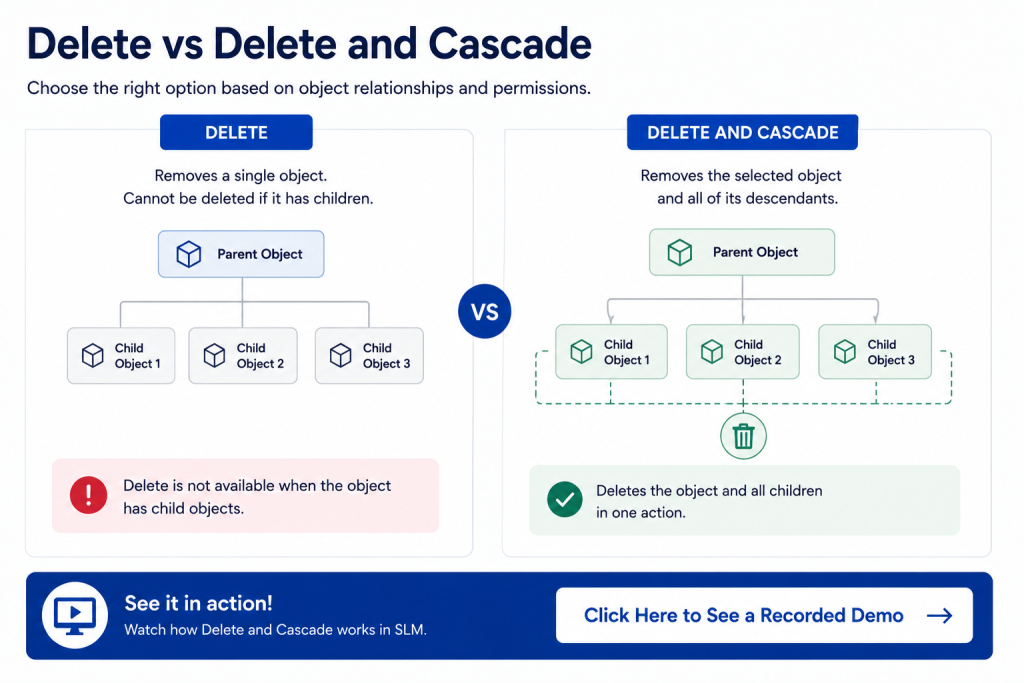
The primary rule is that an object must not have child objects attached before it can be deleted using standard deletion methods.
There are two key exceptions:
- Users with appropriate rights when modifying functions within the Instrument and Systems module.
- Users with access to the Admin Tools feature.
Additionally, an object can only be deleted within the module where it was originally created.
These safeguards help protect lifecycle data and prevent accidental removal of information that is still being referenced elsewhere in the system.
Understanding these rules for deleting objects in SLM helps users avoid common deletion errors and maintain database integrity.
Deleting Objects Using Edit Tools
The most common method for deleting objects is through the Edit Tools menu.
This approach is suitable when deleting individual objects that meet the required deletion criteria.
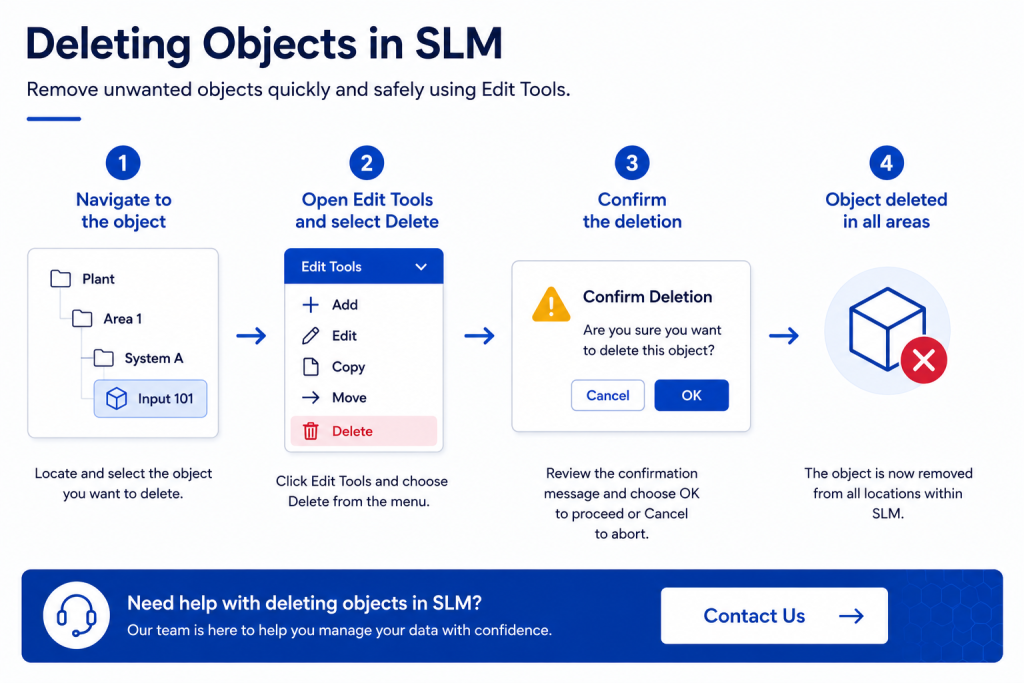
To delete an object using Edit Tools:
- Navigate to the object you wish to delete.
- Open the Edit Tools dropdown menu.
- Select Delete.
- Review the confirmation message.
- Click OK to proceed or Cancel to abort the operation.
Once confirmed, the object is removed from all locations where it exists within the system.
Users should always review the object carefully before confirming deletion because this action cannot easily be reversed.
To learn more about locating records before deletion, see our SLM Search guide.
Why Some Objects Cannot Be Deleted
Users may occasionally encounter situations where SLM prevents an object from being deleted.
This typically occurs when the object has child objects associated with it.
For example, an input may have a device associated with it within the Operate and Maintain module. In this scenario, the parent object cannot be deleted until the child object has first been removed.
The correct process is to:
- Locate and delete the child object.
- Return to the parent object.
- Perform the deletion operation again.
These dependency controls ensure that deleting objects in SLM does not create broken relationships or incomplete lifecycle records.
Using Delete and Cascade in Admin Tools
Users with administrative permissions have access to an advanced deletion option known as Delete and Cascade.
This feature allows administrators to remove an entire hierarchy of objects, including all associated child objects.
Delete and Cascade is particularly useful when removing complete Safety Instrumented Functions (SIFs) or other complex object structures.
Before proceeding, SLM presents a review screen showing:
- Objects that will be deleted
- Objects that will be unlinked
- The overall impact of the deletion
Administrators can then select Confirm to proceed or Cancel to stop the operation.
Because this feature can remove large quantities of data, it should be used carefully and only by authorised personnel.
Understanding Delete vs Delete and Cascade
SLM provides two distinct deletion options that serve different purposes.
| Option | Purpose |
|---|---|
| Delete | Removes a single eligible object that has no blocking child relationships. |
| Delete and Cascade | Removes an object and all associated descendants within the hierarchy. |
Selecting the correct option helps prevent accidental data loss while ensuring hierarchy structures remain valid.
Users should always review the objects affected before confirming any deletion activity.
Deleting Objects from Categories
Another common location for deleting objects is directly within category views.
Within categories, users may see lists of objects such as inputs, devices, or other lifecycle records.
Depending on their permissions, users may have access to:
- Delete
- Delete and Cascade
The availability of these options depends on both the object type and the user’s assigned access rights.
Administrative users typically have broader deletion capabilities than standard users.
Best Practices for Deleting Objects
Before performing deletion activities, organisations should establish clear processes for reviewing and approving object removal.
Recommended best practices include:
- Verify that the object is no longer required
- Review child object relationships before deletion
- Confirm user permissions are appropriate
- Use Delete and Cascade only when necessary
- Review the deletion summary before confirming
- Maintain lifecycle traceability where possible
Following these practices helps reduce the risk of accidental data loss while maintaining a clean and reliable database structure.
For organisations implementing broader digital lifecycle management strategies, our Functional Safety Management Software resources provide additional guidance.
Learn More About SLM Object Management
Understanding how to safely remove records is an important part of effective Safety Lifecycle Manager administration. By understanding deletion rules, object dependencies, and administrative deletion tools, users can confidently manage lifecycle information while protecting database integrity.
Additional resources you may find useful include:
For further information on lifecycle management principles and industrial safety standards, visit the International Electrotechnical Commission (IEC).
Object Manipulation – Deleting Objects
0:06
Welcome to this Application Explainer video, part of our SLM 101 topic range.
0:11
In this video we’ll cover the subject of deleting objects within SLMSLM provides various ways to delete unwanted objects.
0:20
In this video, we’ll be concentrating on rules for deleting objects, deleting objects using edit tools, deleting objects and their descendants using Admin tools, button icons for Delete versus Delete and Cascade.
0:35
There are some rules for deleting objects.
0:37
The object must not have children objects attached.
0:41
The first exception to this users will have the correct rights when modifying functions in the Instrument and Systems module.
0:48
The 2nd exception is users whose accounts have access to the Admin Tools feature.
0:53
The object can only be deleted in the module it was created in.
1:00
The first method of deleting objects will be through the Edit Tools drop down menu.
1:05
Firstly, navigate to the object that you wish to delete.
1:11
Click on Edit Tools and delete the object.
1:15
Whenever you delete an object, you’ll see a confirmation message allowing you to confirm that you wish to delete the object.
1:22
Press Cancel if you do not wish to delete it, or press OK to proceed with the deletion.
1:33
The object has now been deleted in all areas.
1:38
You may encounter a situation where you try to delete an object, but it will not allow you to delete that object using edit tools.
1:47
This occurs when you have an object that you’re trying to delete that also has children associated with it.
1:54
So here in this case you cannot use the delete button because this has a device associated with it in the Operate and Maintain module.
2:02
So when that occurs, you would have to go to the Operate and maintain module, delete that device, and then go back and delete, in this case the input.
2:11
Now somebody with administrative access can delete an entire SIF with all of its children using an option under the Admin tools called Delete and Cascade.
2:21
This allows you to view everything you’re about to delete and whether you’re going to delete it or unlink those objects.
2:29
Press Confirm to delete it completely, or press Cancel to prevent yourself from deleting it.
2:40
Another common area where you can delete is from the categories of these objects.
2:48
Here there’s a list of inputs and you can either delete or delete and cascade with the correct asset access rights.


