Logging Events
Logging events provides a structured record of what happens to safety functions and their associated instruments during operation. Within Safety Lifecycle Manager (SLM), logging events such as demands, tests, bypasses and failures helps build performance information, reports, prior-use records and operational dashboards.
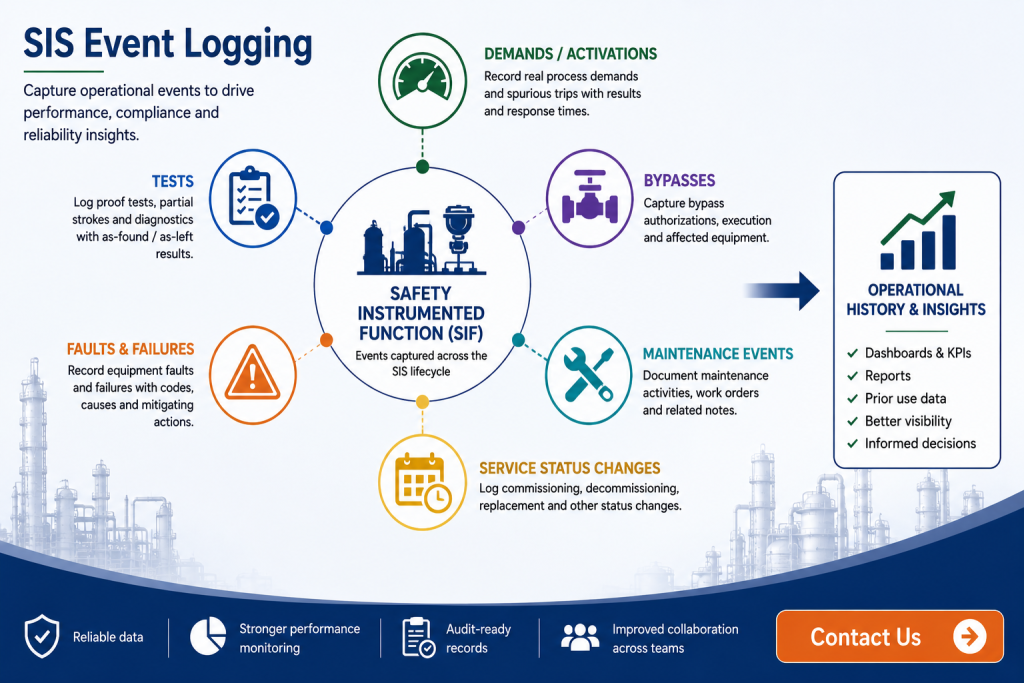
Events can include demands or activations, bypasses, tests, maintenance activities, faults and failures, and service status changes. Each type captures information relevant to what happened, which functions and devices were involved, and what the outcome was.
This guide explains the SLM event-logging workflow, the operational events that can be captured, how manual and automated event records are handled, why approval matters, and how finalized event information contributes to performance monitoring.
What Is Logging Events in SLM?
SIS event logging is the process of recording operational activities and occurrences involving safety instrumented functions and their associated equipment. These records provide the underlying data needed to understand how safety functions and devices are performing during actual operation.
Within SLM’s Operate & Maintain module, users can capture demands or activations, bypasses, tests, maintenance events, fault or failure events, and Service Status Change Events.
Events can be initiated at different levels of the SLM object hierarchy depending on the event type and workflow. For example, an operational event can be initiated from a unit and associated with the relevant function, or it can be recorded directly from the function itself. Test events can also be initiated from an applicable test group.
Capturing this information consistently provides more than an event history. Once the appropriate workflow and approval requirements have been completed, the resulting data can contribute to reports, KPI dashboards and other operational records.
For broader context on the equipment and functions being monitored, the Safety Instrumented System guide explains the role of SIS functions and equipment within the functional safety lifecycle.
Operational Event Types Captured in SLM
Logging events consistently allows different types of operational activity to become part of the same structured SIS lifecycle history.
Different operational events answer different questions about SIS performance. A demand event records an occasion when the safety function was called upon to respond. Test events capture the results of planned testing activities, while fault and failure events provide information about equipment problems identified during operation.
Bypass events record periods when a safety function or associated equipment is bypassed. Maintenance events provide a record of relevant maintenance activity, while Service Status Change Events document changes such as commissioning, decommissioning and equipment replacement.
The type of event affects the information that needs to be captured. A demand, for example, can include whether it was a real process demand or a spurious trip, the result of the demand, function response time, fault codes, contributing factors and related events.
That classification matters because different event characteristics can affect how the resulting information is categorized and subsequently represented within SLM reports and dashboards.
Where an event changes whether equipment is actively in service, the Service Status Change Event guide explains how SLM records commissioning, decommissioning and other lifecycle status changes.
Logging Events Manually in SLM
SLM provides step-by-step workflows for manually recording operational event results. The exact fields and stages vary according to event type, but the objective is to capture enough information for the event record to represent what actually occurred.
For a demand event, the general information can include the event date and time, description, demand type and overall result. Users can also record function response time, fault codes, contributing factors and related demand events where applicable.
The workflow can then identify the devices associated with the safety instrumented function that participated in the event. Users can select individual devices or, where appropriate, include the relevant input and output equipment.
Where failures occurred, the affected instruments can be identified separately. SLM can populate pass information for equipment not selected as having failed, while the failed equipment can have additional details recorded.
These details can include as-found and as-left information, failure codes, notes, mitigating actions, whether the issue is safety critical, associated maintenance information and work-order references. Observed device response times can also be captured where applicable.
Recording Tests and Bypass Events
Although the principles of SIS event logging remain consistent, tests and bypasses have workflows designed around the information required for those particular activities.
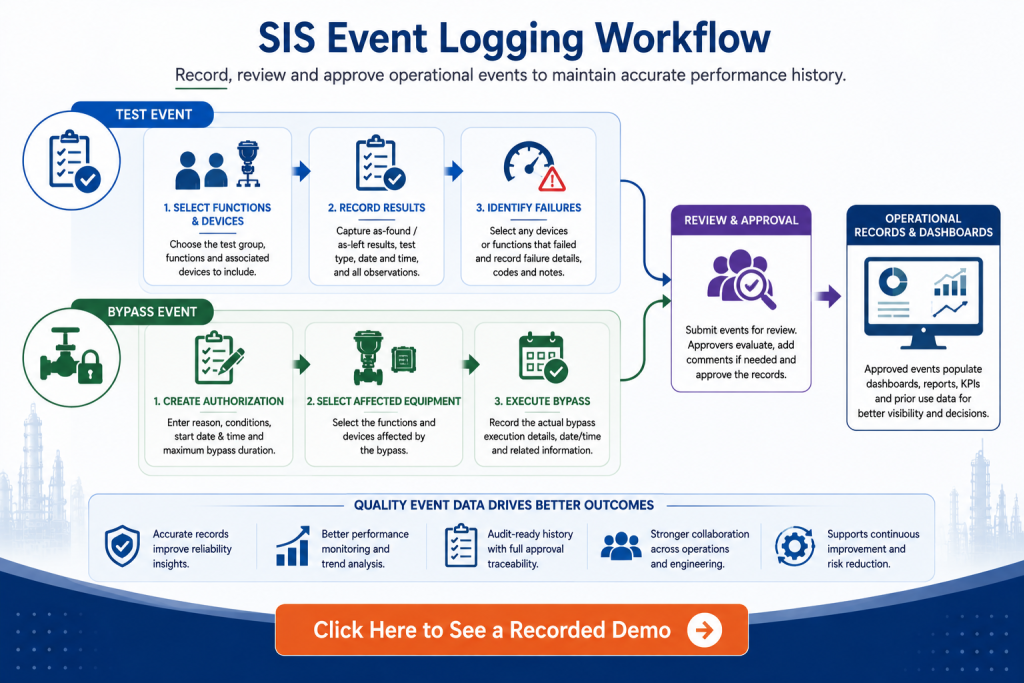
A test event can be initiated from the unit or from a test group containing the relevant functions and devices. The workflow can record as-found and as-left results, identify which functions were included in the test, select the associated devices and document failures for functions or equipment.
Where testing needs to be deferred, the demonstrated SLM workflow also provides a test-deferral authorization process. Once testing takes place, the resulting event information can become part of the operational history for the affected equipment.
The Configuring Test Groups guide explains the related SLM workflow for organizing equipment into groups used for testing activities.
Bypasses can similarly be initiated from the unit or the affected function. A bypass authorization can record information such as the reason for the bypass, operating conditions, anticipated start date and time, and the applicable maximum allowable bypass duration configured for the organization.
The workflow can also capture related HAZOP information, associated procedures and the devices included in the bypass. Following authorization, the bypass event provides the execution record showing when the bypass actually occurred and supports the applicable approval workflow.
Automated Event Records and Historian Integration
Operational event information does not always have to originate from manual entry. Where Historian Integration has been configured, SLM can support semi-automated capture of applicable operational events.
The training workflow demonstrates Automated Event Record notifications for information such as demand events, bypass activations, faults and test events received through the integration.
Access to these Automated Event Record notifications is controlled through the user’s profile. Users with the applicable AER notification setting can receive notifications when qualifying records are generated.
For example, when a demand event occurs, an appropriate user can receive an email and an in-system notification indicating that an event has been detected. The record can then be reviewed as part of the applicable SLM workflow.
This distinction is important: automated detection can reduce reliance on users manually identifying that an event occurred, but the resulting operational record still needs to follow the organization’s configured review and approval process where required.
Event Approval and Audit History
Approval is an important stage because simply creating an event does not necessarily mean that its information should immediately affect operational calculations.
Logging events with the appropriate review and approval controls helps ensure that operational calculations are based on information that has been checked before it contributes to reports and KPIs.
For applicable Operate & Maintain reports and KPI dashboards, the event needs to be reviewed and approved before it is taken into consideration by the relevant calculations.
Demand, bypass and test event records can therefore be submitted to users configured as approvers for the applicable site. Submission generates a notification to the selected approver so the event can be reviewed.
Depending on configured roles and responsibilities, a user designated as an approver may also have authorization to approve an event themselves.
SLM maintains an approval history showing information such as when the event was submitted, who it was submitted to, when approval occurred and who approved it. This provides an auditable record around both the operational event and its review.
How Event Data Supports Prior Use and Reliability Tracking
Logging events can also contribute to equipment reliability history. Where a commissioned device is correctly associated with a Prior Use Certificate, applicable event results and operating information can contribute to the accumulated data held against that PUC.
This creates an important relationship between event quality and reliability information. Tests, demands, bypasses, failures and other applicable events do not exist only as standalone historical records; they can become part of the operating experience associated with the equipment.
The How to Gather Prior Use Failure Rate Data guide explains how commissioned devices and their finalized or approved events contribute information to associated Prior Use Certificates.
The underlying model-level records are covered in the Failure Rate Library, which explains how SLM manages Prior Use Certificates, reliability sources and accumulated operating experience.
This connection makes consistent event classification particularly important. Reliable lifecycle analysis depends on knowing what occurred, when it occurred, which equipment was affected and what the result was.
How Logging Events Supports Dashboards and Metrics
Once applicable events have been recorded and completed through the required approval process, SLM can use that information to populate Operate & Maintain dashboards and reports automatically.
For bypass management, site- and unit-level information can show active bypasses, approved authorizations awaiting execution, records awaiting approval and closed bypasses. This gives users visibility into current and historical bypass activity rather than requiring each event to be reviewed independently.
Demand information can also contribute to Tier 3 metric scorecards. These views can help users compare actual demand experience with the applicable design or PHA demand rate and investigate functions whose operational experience warrants further review.
Users can move from summarized metrics into the underlying event records to investigate the information behind the result. The Tier 3 Metrics guide covers this performance-monitoring workflow in greater detail.
Event records therefore form the underlying evidence for many higher-level performance views. A dashboard can summarize trends, but the value of those trends depends on the quality and completeness of the operational records from which they are calculated.
Why Operational Event Records Matter for SIS Lifecycle Management
Safety instrumented systems continue to generate important lifecycle information after commissioning. Demands occur, equipment is tested, bypasses are applied, failures are discovered, maintenance is performed and devices move into and out of service.
Capturing these activities in structured records provides a chronology that can be reviewed when assessing equipment performance, investigating recurring problems or understanding why operational indicators have changed.
This operational focus is consistent with the wider SIS lifecycle framework. IEC 61511-1 addresses safety instrumented systems across lifecycle activities including operation and maintenance. The specific event-entry, automated-record and dashboard workflows described here are SLM capabilities rather than workflows prescribed by the standard.
Maintaining that distinction is important. Functional safety requirements establish the lifecycle framework, while organizations need suitable processes and records to demonstrate how their own equipment is being operated, maintained and monitored.
Managing Operational Events with Safety Lifecycle Manager
Logging events in SLM connects individual operational occurrences with broader lifecycle information. Manual workflows allow users to document detailed event results, while configured Historian Integration can assist with identifying applicable events through Automated Event Records.
Approval workflows provide review and traceability before applicable event information contributes to calculations. Once finalized, event data can support dashboards, reports, Tier 3 metrics, prior-use information and investigation of equipment performance.
The MSS Safety Systems solution supports the broader management of safety-system lifecycle information. Within its Operate & Maintain workflows, structured event capture provides the operational evidence needed to understand what has happened to functions and devices after they enter service.
The objective is not simply to build a larger event database. It is to maintain usable operational history that engineers and functional safety teams can trace from summarized performance indicators back to the events and equipment that produced them.
Logging Events
0:07
Welcome to this application explainer video, part of our operate and maintenance topic range.
0:13
In this video we will be covering the subject of logging of events.
0:19
The SNM Operate and Maintain module is used to capture events for the safety functions and instruments.
0:25
Collecting this data leads to the automated population of key Performance indicators, reports, prior use collection, and better visibility into the performance of the facility.
0:36
What we’ll cover in these chapters Chapter One Event Types Within the SLM System, Chapter 2 Manual Entry Event Workflow, Chapter 3 Historian Integration, Automated Event Records, Chapter Four, Event Approvals, and Chapter 5 Dashboard Population.
1:01
In Chapter One, we’ll be covering what type of events can be captured within the SLM system and the things to consider.
1:08
Are there any prerequisites for the event capture and dashboard population?
1:13
Today we’ll be looking at the logging of operational events within the SLM system.
1:17
First, the user should navigate to the Operate and Maintain module using the Module slider at the top.
1:26
From then we’ll use the SLM object tree to navigate to the unit object to identify different types of events that are available in the SLM Operate and Maintain module.
1:38
Using the Edit Tools button, we’ll be able to see a list of events that are available for capture here within this module.
1:46
These events include demands or activations, bypasses, tests, maintenance events, fault failure events, and service status change events.
2:00
Operational events can be logged from different levels of the SLM object tree.
2:06
From the unit selecting an event, the first step will be to identify the function that you’re looking to log for this event.
2:13
If you want to log the event directly on the function, you can navigate using the object tree to that function object and log the event from there.
2:22
The first step will now just be entering the general data.
2:26
If you’re logging test events, then you can kick the logging of that event off from the actual test group object and enter test deferral authorization or recording of a test event using various buttons in chapter 2.
2:43
We’ll be covering manual event entry workflow, differences in workflow for different event types and things to consider.
2:51
At what level is the event created?
2:53
What information is important to the capture for dashboards and reports?
2:58
For operational events, the SLM system is a step by step workflow to allow users to manually enter those event results.
3:06
We can log the demand event from the unit or here from the actual function itself.
3:12
Going to the Edit Tools button, we can add a demand event and you can see the steps available for logging information here.
3:20
Each event type has slightly different characteristics and information that can be captured, but the intent is to complete the full results of those events so that the SLM operate and maintain.
3:30
Dashboards and reports are complete and valuable.
3:36
For the General Data tab of this, we have to enter information in and around the event date, time, description, and demand type.
3:44
What type of demand is this?
3:47
Is it a real process demand?
3:48
Is it a spurious trip?
3:49
This may affect some of the dashboards and how this evidence categorised in the calculations that are affecting them.
3:55
What is the demand result?
3:57
I’ll put a pass with failed safe failures.
4:00
We can enter a function response time.
4:02
We can enter in any fault codes, any contributing factors, any related demand events, and the results as well.
4:10
Using this Next button, we can move to Step 2, where we’re able to select the devices that are associated with the SIF.
4:16
That’s again to be part of this demand event so I can individually select these or using this check box, I’ll capture all of the input and output devices.
4:27
Using the next step, I can move to Step 3, where I identify the failures, so which these pieces of instrumentation had a failure associated with them.
4:36
I can select them individually again using the check box.
4:39
To get all of them, Select Next then prompts me to add information about the failures.
4:45
So for all the instruments that we have not selected as having failures in step three, the SLM system will automatically fill these in with pass information.
4:56
But here for the failure codes we can add the As found as left information.
5:00
Here we can capture any failure codes for the As found as left failure type, any notes descriptions, mitigating actions.
5:07
Is it safety critical And then getting into any maintenance activities that might be required?
5:12
Is there a work order number?
5:14
Is there any maintenance notes associated with that?
5:17
So that we can capture the kind of information for each of the failures here and then once that’s complete using the next, we can enter in the device response times for the output.
5:26
The SIFT function response time is entered on the step one General Data tab, but here I can see what the target response time is and I can log the observed response time as this event took place.
5:38
Once all of that information is complete, you can hit save and SLM will take you to the demand event object where we can look at adding any other information or going through the actual approval process.
5:50
For capturing a testing event, we can navigate again to the unit object or to the test group object where there may be multiple functions and multiple devices associated with them.
6:00
On the test group object we can select Record Test event where if we need to go through a deferral we can use this button to defer the test event by hitting record.
6:10
You can see the step by step workflow very similar to demand event workflow.
6:15
So selecting the as found and as left for the functional test, selecting which functions of this test group are part of this test if you’re testing multiple functions at the same time, of those functions that are associated devices, which of them are being captured as part of the test, Selecting the failures and entering the failure data for functions and the failed devices as well.
6:37
So it’s a very similar workflow to the demand event workflow, but slightly different for capturing the test events.
6:44
For capturing bypasses we can navigate either to the unit or against the actual function that we’re putting in bypass.
6:51
Using the Edit tools button we can add a bypass authorisation.
6:55
Again a step by step workflow allowing you to either create a new bypass authorisation or copying one that may have previously been completed.
7:02
Here we’ll create a new one.
7:04
You can enter in information around the bypass authorisation, Any descriptions, Reasons for the bypass plant, operating conditions at the time of bypass, anticipated start dates and times.
7:16
This is putting in the maximum allowable bypass duration as set in the global module for the organization.
7:21
Once we have all of this information captured, we can go to next and look at any HAZOP data that may be related to this function going into bypass.
7:29
So how does this functional bypass affect the hazardous scenarios that it may be related to?
7:34
We can enter in some information around that, any procedures that may be associated with those.
7:39
We can then hit next and select the devices that are again associated with the SIF, which of them are going to be part of this bypass or use the full loop.
7:47
We can also individually select devices that may be associated with it and then we can hit save.
7:54
This has queued up the bypass authorization, but then has taken us to the bypass event.
7:59
We can then go through the execution process where we can note where the actual bypass took place, where it’s at.
8:06
We can also go through the approval process here to make sure the right people approving this bypass is able to happen.
8:16
In Chapter 3 we’ll be covering Historian integration and Automated Event records and things to consider roles and responsibilities of qualifying events.
8:26
If the user has set up a Historian Integration to semi automate the caption of the events like activations or bypasses in the SLM system, the user will see these automated event record notifications which is in this yellow triangle up here.
8:40
It’s specific to the individual user account.
8:43
If you select this, it will pull up a list of those events, demand events, bypass activations, faults, test events that are being pulled from the automated event record so you can see how they’re coming in, what they look like, where they’re coming from, the CGI, the activation source for the actual bypass authorisation.
9:05
With this, the user needs to understand that only certain individuals will have access to the automated event record.
9:11
It’s a part of your user profile that can be turned on.
9:14
It’s simply AER notifications that can be selected here.
9:20
Individuals that have access to the Automated Event record will receive notifications about the records as they’re taking place.
9:27
When a demand event happens, an individual will get an e-mail and a notification within the tool allowing them to understand that the event has taken place.
9:39
In Chapter 4, we’ll be covering Event approval workflow and things to consider.
9:45
Who is responsible for the approvals?
9:47
Is the role configured to allow approvals before these events are taken into consideration?
9:53
For the calculations that are happening on some of the SLM operate and maintain reports and KPI dashboards, the event needs to be viewed and approved for it to continue with the calculations.
10:04
So on an actual event, whether it’s a demand event, a bypass event or a test event, when come to the actual event you’ll see a demand Event approval tab here.
10:15
With this we can submit to individuals that are selected at this particular site that are set up as approvers.
10:21
We can select them and save it and submit to approval.
10:31
This will then send an e-mail to that individual letting them know that this event is up for approval and is their responsibility to do that.
10:40
If you use the user A designated as an approver, you may have the authorisation to self approve the event that is set up as part of the roles and responsibilities that you as an individual will have.
10:50
This will keep an entire log of all the approvals that have taken place when it was submitted, who it was submitted to, when it was approved and who approved it.
11:00
All of that information is captured here in the Demand Event Approval log in Chapter 5.
11:09
We’ll be covering a dashboard and things to consider.
11:12
Has the event been approved and finalised?
11:16
Once these events are captured in the SLM, operate and maintain module, and have gone through the correct approval process, they’ll start to automatically populate on various dashboards.
11:26
So talking about bypasses, a unit level or site level, there’s a Bypass Status tab that allows you to view any active bypasses, any approved bypass authorisations that are pending bypass, any ones that are not approved, any ones that have been submitted to approval and all of the closed bypasses with notes on if they’ve been exceeding their approval time for bypass for demands and other pieces, they’re Tier 3 metric scorecards that capture what is the demand rate versus what is the real demand that’s taken place, how many of them are there?
12:02
From a bad actor’s perspective, we can look at these metrics and see for demand rates, which of my Sips are not meeting their design PHA demand rate, look at the number of demands.
12:13
I can click on these and I can see those demand objects here and go in and find information about them.
12:20
So once those events are logged and approved, they’ll start to automatically begin populating on these dashboards and reports that are now available for the user to access.


