
Scheduling Reports
SLM scheduling reports allow administrators to automatically generate and distribute reports at predefined intervals. By scheduling reports to run daily, weekly, or monthly, organisations can ensure stakeholders receive important information without manually generating reports each time.
Automated reporting helps improve consistency, reduces administrative effort, and ensures key operational and functional safety data is delivered on time. Reports can be configured with specific parameters, recipients, and schedules to suit organisational requirements.
This guide explains how to configure scheduled reports, select report parameters, manage report schedules, and run reports on demand within Safety Lifecycle Manager.
What Are SLM Scheduling Reports?
SLM scheduling reports are automated reporting tasks that generate reports at predefined intervals using saved parameters.
Once configured, reports run automatically and are delivered to nominated email recipients without requiring manual intervention.
Scheduled reports help organisations:
- Automate recurring reporting
- Reduce manual report generation
- Deliver consistent operational information
- Support regular compliance reporting
- Keep stakeholders informed automatically
This capability ensures important information is available when it is needed while reducing administrative workload.
To understand where reports can be viewed after generation, see our Dashboard guide.
Configuring SLM Scheduling Reports
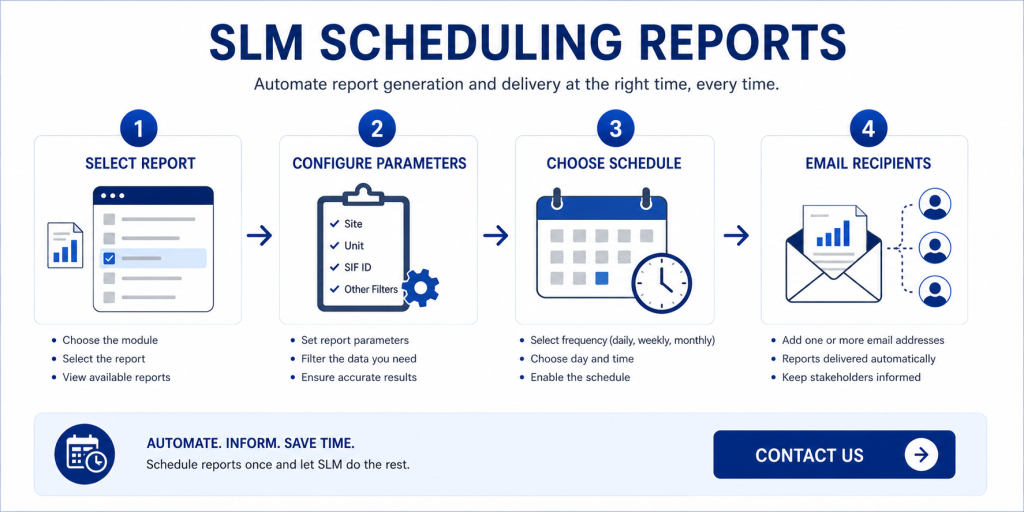
Configuring SLM scheduling reports begins in the System module.
To create a scheduled report:
- Open System Module.
- Select Reports and Parameters.
- Open Schedule Reporting.
- Click Add Schedule Report.
- Select the required module.
- Select the report to schedule.
After selecting the report, SLM guides administrators through the remaining configuration steps.
Selecting Report Parameters
Each scheduled report requires its own reporting parameters.
Depending on the report selected, administrators may choose:
- Site
- Unit
- SIF ID
- Other report-specific filters
The available options vary depending on the report type being scheduled.
Selecting appropriate parameters ensures users receive only the information relevant to their operational responsibilities.
To quickly locate records before configuring report parameters, see our SLM Search guide.
Setting Report Frequency and Email Delivery
SLM scheduling reports support flexible scheduling options to match business reporting requirements.
Available frequencies include:
- Daily
- Weekly
- Monthly
Administrators can specify:
- Run time
- Day of the week
- Day of the month
- One or more email recipients
Multiple email addresses can be entered by separating each address with a comma.
Once saved, scheduled reports automatically run according to the configured schedule.
Managing Scheduled Reports
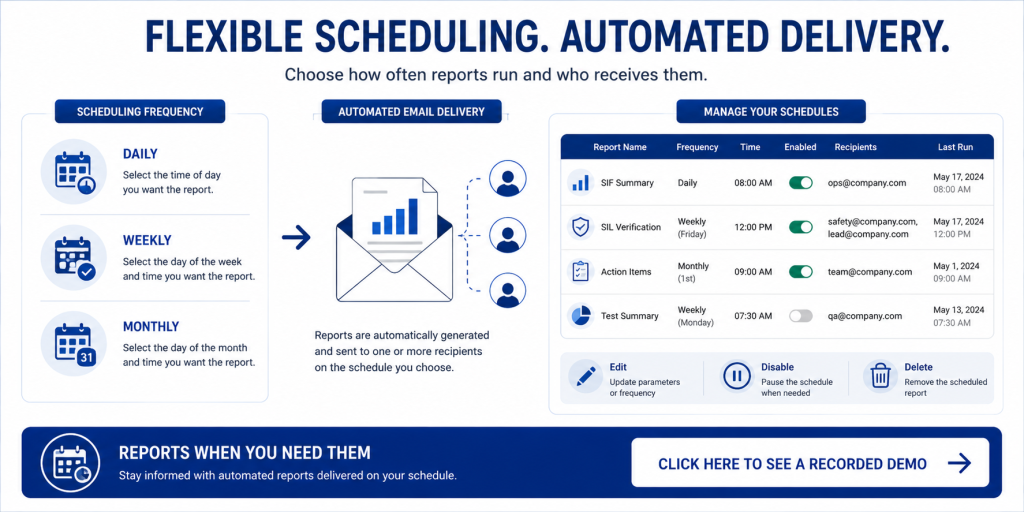
All configured reports are displayed within the Schedule Reporting interface.
Administrators can review:
- Module
- Report name
- Frequency
- Scheduled time
- Enabled status
- Email recipients
- Run parameters
- Last run date
Existing schedules can be modified, disabled, or removed whenever reporting requirements change.
Running Reports on Demand
In addition to scheduled execution, reports can also be generated manually.
Running reports on demand allows users to immediately produce the latest information without waiting for the next scheduled execution.
This is particularly useful when reviewing recent changes, supporting audits, or preparing for meetings that require the latest available data.
Benefits of SLM Scheduling Reports
SLM scheduling reports help organisations automate routine reporting while ensuring stakeholders receive timely information.
Key benefits include:
- Automatic report generation
- Flexible daily, weekly, and monthly schedules
- Email delivery to multiple recipients
- Consistent reporting parameters
- Reduced manual administration
These capabilities improve reporting efficiency while helping organisations maintain visibility across functional safety activities.
To learn how Safety Lifecycle Manager supports digital functional safety workflows, see our Functional Safety Management Software guide.
Learn More About Reporting in SLM
Scheduling reports is one of several reporting features available within Safety Lifecycle Manager. Combined with dashboards, search, and module reporting, scheduled reports help ensure users always have access to current operational information.
You may also find these related guides useful:
For additional information on scheduling automated tasks and reports, visit the Job Scheduler overview.
Scheduling Reports
0:06
Welcome to this IT Explainer video, part of our configuration topic range.
0:11
In this video we will cover the subject of scheduling reports in SLM.
0:16
The scheduled report in SLM is a predefined task configured to run automatically at specific intervals using predetermined parameters.
0:24
These tasks generate reports and deliver them to the user without requiring manual initiation, ensuring timely and consistent access to relevant data.
0:34
The following information will be covered in this training, how to configure a scheduled report and how to run scheduled reports on demand.
0:45
In order to schedule a report, administrators need to come to the system Module Reports and Parameters Schedule Reporting.
0:55
Then click on Add Schedule Report.
0:57
The first step in the workflow will allow administrators to select the module and then it will display all the available reports for the selected module.
1:08
Then click next.
1:10
Depending on the selected report, parameters will vary.
1:13
Here the parameters for this specific report are the site and unit and then select a SIF ID.
1:21
So let’s select the default site and unit and we’ll select two Sifs.
1:29
Click on next.
1:31
Then we select the frequency on how often we want to receive that report.
1:36
The option enable is selected by default.
1:39
The frequency can be daily, weekly, or monthly.
1:43
If we select daily, we just need to specify what time we’d like to receive the report.
1:52
If we select weekly, the parameters will change and we can select the day of the week.
1:58
And if we select monthly, we can select which day of the month we’d like to receive the report.
2:08
So for now, let’s just select weekly and we’ll select Friday.
2:12
Then we select the time.
2:18
Let’s go with 12:00 PM.
2:21
And finally, we just need to add a list of e-mail addresses that we want the report to be sent to.
2:26
If we’re going to use more than one e-mail address, then we simply separate them using a comma.
2:32
Then click Save.
2:35
The main interface of the scheduling report will display all of these scheduled reports that have been created so far with the module.
2:43
The report name, frequency, what time the reports are scheduled, if the report is enabled or not, who it’s going to be sent to, and the run parameters that have been selected for the report to run and when was the last time that the report was run.
3:01
And then from this interface, users can modify the parameters and the frequency or even disable the report.
3:09
If we want to stop the scheduled reports from generating, reports can be removed from the scheduled reporting feature and also reports can be run on demand.
3:23
As we can see, we have received the report that we just run.


