
Configuring an FSA
Configuring an FSA allows administrators to customise how Functional Safety Assessments are performed while maintaining alignment with IEC 61511 requirements. Safety Lifecycle Manager (SLM) provides flexible configuration options for assessment checklists, checklist items, FSA stages and conformance mappings, enabling organisations to tailor assessments to their own functional safety management processes.
Although SLM includes a complete set of default Functional Safety Assessment checklists, organisations often need to add company-specific questions, adjust checklist descriptions or configure additional assessment content. These changes can all be managed through the System module without affecting the integrity of the IEC 61511 assessment workflow.
This guide explains how configuring an FSA works, the available configuration options and the recommended approach for maintaining compliance while adapting assessments to your organisation’s requirements.
Configuring an FSA Checklists
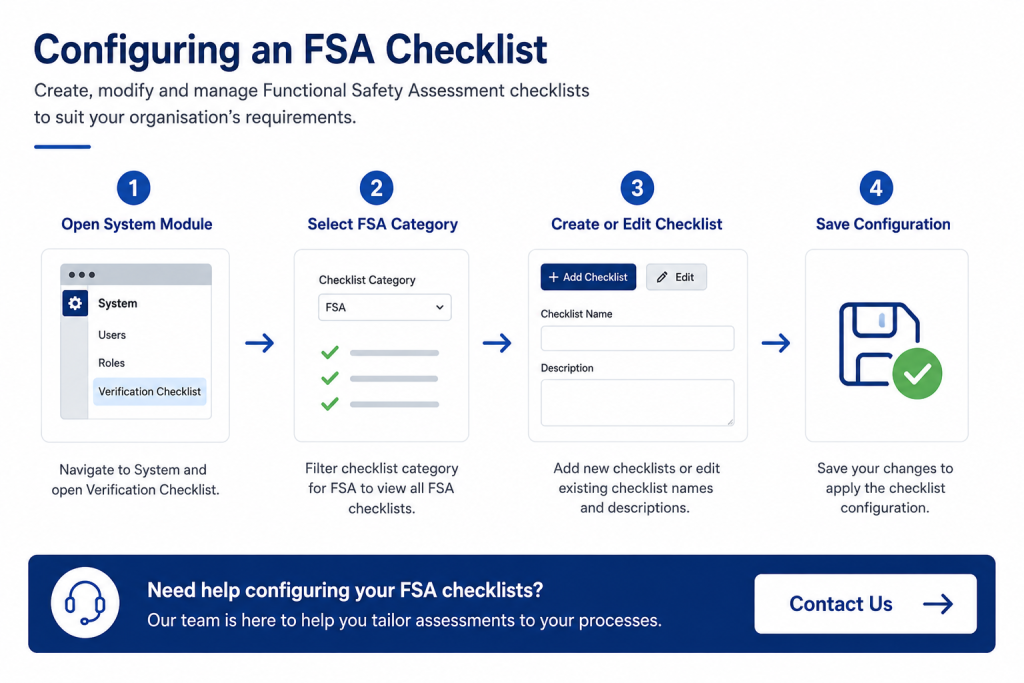
Configuring an FSA begins with the Verification Checklist configuration area within the System module. Administrators can modify existing Functional Safety Assessment checklists or create entirely new checklists for use during future assessments.
Standard IEC 61511 checklists are supplied by default and provide the foundation for every Functional Safety Assessment performed within Safety Lifecycle Manager.
- Edit checklist names.
- Update checklist descriptions.
- Create new FSA checklists.
- Assign checklist categories.
- Maintain company-specific assessment templates.
Only administrator accounts can modify Functional Safety Assessment checklist configurations.
IEC 61511 FSA Stage Configuration
Each Functional Safety Assessment is associated with one of the IEC 61511 Functional Safety Assessment stages. Safety Lifecycle Manager provides configurable stage values while recommending that organisations retain the default IEC 61511 stages wherever possible.
Although additional stage values may be created, modifying the standard stage numbering is generally not recommended because the supplied stages align directly with IEC 61511 guidance.
- Stage selection.
- Default IEC 61511 stages.
- Optional additional stages.
- Stage-specific checklist assignment.
Learn more about the assessment process in our Conducting an FSA guide.
Configuring FSA Checklist Items
Configuring an FSA also includes managing individual checklist items contained within each Functional Safety Assessment checklist.
Administrators can:
- Edit checklist item descriptions.
- Hide standard checklist items.
- Create additional checklist items.
- Maintain organisation-specific questions.
Standard checklist items supplied with Safety Lifecycle Manager cannot be deleted, ensuring compliance with the supplied IEC 61511 assessment templates. However, they may be hidden when alternative company procedures are required.
Configuring FSA Checklist Associations
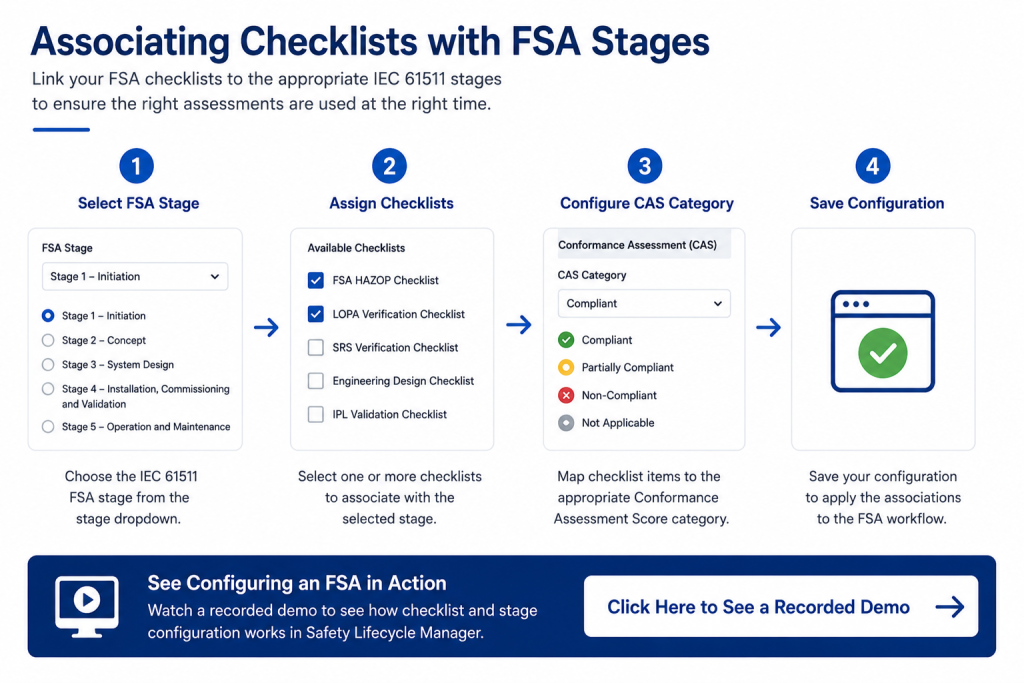
Once checklists have been created, they must be associated with one or more Functional Safety Assessment stages using the FSA Checklist Reference configuration tables.
Each checklist can be assigned to one or multiple assessment stages depending on organisational requirements.
For example:
- HAZOP Verification.
- LOPA Verification.
- SRS Verification.
- Engineering Design Verification.
- IPL Validation.
If a checklist is required for multiple assessment stages, a separate association is created for each stage.
Configuring Conformance Assessment Categories
After checklist associations have been configured, checklist items can be mapped to Conformance Assessment Score (CAS) categories.
This allows assessment results to be categorised consistently across all Functional Safety Assessments.
Benefits include:
- Consistent scoring.
- Improved reporting.
- Standardised audit evidence.
- Repeatable Functional Safety Assessments.
Each checklist item may be assigned to a single CAS category, ensuring clear reporting and assessment consistency.
Best Practices for Configuring an FSA
When configuring an FSA, organisations should preserve the supplied IEC 61511 assessment structure wherever practical while extending checklists to accommodate company-specific procedures.
Recommended best practices include:
- Retain default IEC 61511 stage numbering.
- Avoid deleting standard assessment content.
- Add organisation-specific checklist items instead of replacing standard questions.
- Maintain consistent checklist naming conventions.
- Review checklist configurations regularly.
This approach provides flexibility while preserving compliance with recognised Functional Safety Assessment practices.
Why Configure Functional Safety Assessments in SLM?
Configuring an FSA within Safety Lifecycle Manager enables organisations to standardise Functional Safety Assessments while supporting site-specific procedures and company standards.
Key benefits include:
- IEC 61511 aligned assessment templates.
- Flexible checklist management.
- Stage-specific assessment workflows.
- Configurable checklist items.
- Consistent assessment reporting.
- Reduced administration.
- Improved compliance.
Learn more about the Functional Safety Assessments Module.
Related Functional Safety Resources
You may also find these guides useful:
- Conducting an FSA
- SIS Audits
- Functional Safety Assessment (FSA)
- IEC 61511
- Functional Safety Management Software
For additional information on the IEC 61511 standard, visit the International Electrotechnical Commission (IEC).
Configuring an FSA
0:06
Welcome to this Application Explainer video, part of our FSA topic range.
0:10
In this video, we will cover the subject of configuring Fsas within SLM’s Functional Safety Assessment module.
0:18
Fsas may be conducted using sets of checklists based on the selected FSA stage.
0:24
These checklists may be configured to adjust the checklist items by the administrator in the System module.
0:33
In Chapter 1, we’ll cover modifying FSA checklists, how to configure and adjust FSA checklists and items, and things to consider.
0:43
FSA stages conform with IEC 61511 and should not be changed from existing stage numbers and default FSA checklist items cannot be deleted but instead may be hidden.
0:56
Functional safety assessments in SLM contain several checklists to be filled out by the executing team, which are based on the stage number of the FSA when it is started.
1:06
These checklists are provided by default in conformance with the FSA requirements in IAC 61511, but SLM will still allow administrators to modify or configure the checklists and checklist items that are generated by SLM when executing the FSA.
1:24
If your account is an Administrator account, you can open the System module and view the Verification Checklist menu in this table.
1:33
Filtering the checklist category for FSA will narrow the checklist to only display those that can be displayed in the FSA functionality.
1:44
Clicking the Edit button in the row of a checklist will allow for the checklist name and description to be modified.
1:51
Attempting to hide an FSA checklist will not actually hide the checklist from the FSA, as this option is used for other checklist display functionality.
2:03
Hiding checklists from the FSA are configured in the FSA Checklist reference table, which we’ll cover in a moment.
2:11
To create a new FSA checklist, click the Add Checklist button in the top right corner of the table and enter the fields displayed, ensuring that the value in the checklist category is FSA.
2:25
After creating a new checklist, the items for the checklist will then need to be configured for a new checklist of FSA.
2:32
Hiding them will ensure that these checklists will not be displayed in the general checklist functionality.
2:39
In an existing checklist, we can open up the checklist items by clicking on the name of the checklist.
2:47
Standard items are noted by the standard field marked Yes and cannot be deleted, but they may be hidden from view.
2:55
To configure this and other fields for the item again, click the Edit button on the furthest left side of the row.
3:03
And if the checklist item description is to be modified, here’s where to do that.
3:08
Hiding the checklist will hide the standard checklist from the view in the FSA checklist functionality.
3:16
Since Fsas are identified by stages one through 5 as guided by IEC 61511, SLM will have a drop down identifying these stages.
3:32
In this FSA Stages drop down, FSA stage values are present and may be configured.
3:39
Is MSS’s recommendation not to change the FSA values from the default list, but they may be configured here nonetheless.
3:48
Any new stage values that desire to be added may be added here with any new or modified checklist now configured for the content.
3:57
They must now be configured for association to the appropriate FSA stage in the FSA Checklist reference table.
4:08
Existing FSA checklists may be configured to be associated with different FSA stage values for the FSA stage dropdown values, or newly created FSA checklists may be added to the table with the associations to one or more FSA stages.
4:25
For example, the FSA HAZOP checklist is associated to all 5 FSA stages.
4:34
If a new checklist is to be associated with more than one stage value, then each stage value will require a new row entry.
4:42
After checklists are configured for association with stages in the FSA Checklist Reference table, the Checklist Conformance Reference table may then be used to associate the specific FSA checklist items with an appropriate CAS or Conformance Assessment score category.
5:04
Each checklist item may be selected for only 1 Cass category.
5:14
We can see the categories are already identified in some of the checklist items already.
5:20
The options to this value must be one of the options that are in the Competency Categories drop down menu.
5:31
As with other dropdown tables, the existing values here may be modified or new ones added, which may then be associated to the checklist items back in that checklist conformance reference table.


